Category Archives: honeywell

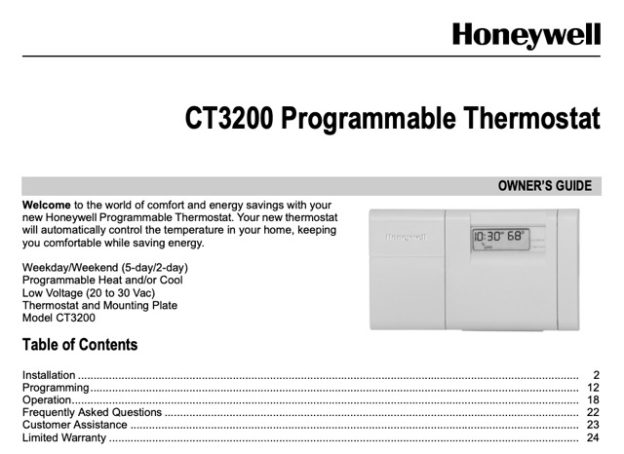
Honeywell Thermostat CM921 User Manual

Honeywell Thermostat CM921 User Manual

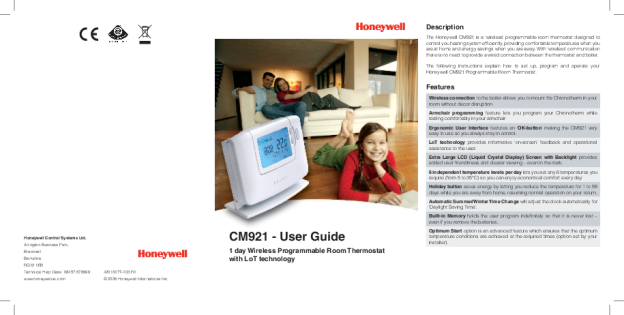
The Honeywell Thermostat CM921 User Manual is a 19-page booklet, document 42011077-103 R1, dated 2006 and published by Honeywell Control Systems Ltd. The CM921 is a 1 day wireless programmable room thermostat that talks to an HC60NG relay box, so no thermostat cable runs between the two. This page follows it through setup, programming, the modes, the holiday function, the user parameters, cooling and the eight faults it prints.

Download the Honeywell CM921 User Manual (PDF)

Table of Contents

What Is the Honeywell CM921?

Page 1 describes the CM921 as a wireless programmable room thermostat designed to control a heating system efficiently, providing comfortable temperatures when you are at home and energy savings when you are away. The link to the boiler is wireless, so the booklet covers no wiring for the thermostat itself; the connections sit at the boiler and the HC60NG relay box. The unit has a backlit LCD, an OK confirm key, six temperature levels per day, a holiday button, automatic summer and winter time change, and a memory that holds the program when the batteries come out. Optimum Start and the OFF-mode frost value are installer settings.

Controls and Display

Page 2 prints a numbered drawing of fifteen parts. The instructions use the slider switch with its five positions, DATE, PROG, AUTO, MAN and OFF; the up and down temperature arrows; the green OK button; the left and right program arrows; the enquiry button marked with an i; the holiday button marked with a suitcase; and the plus and minus time buttons.

Setup: Batteries, Date and Time

Step 1: Fitting the Batteries

Follow these steps only if the screen is blank, with no symbols or digits displayed.

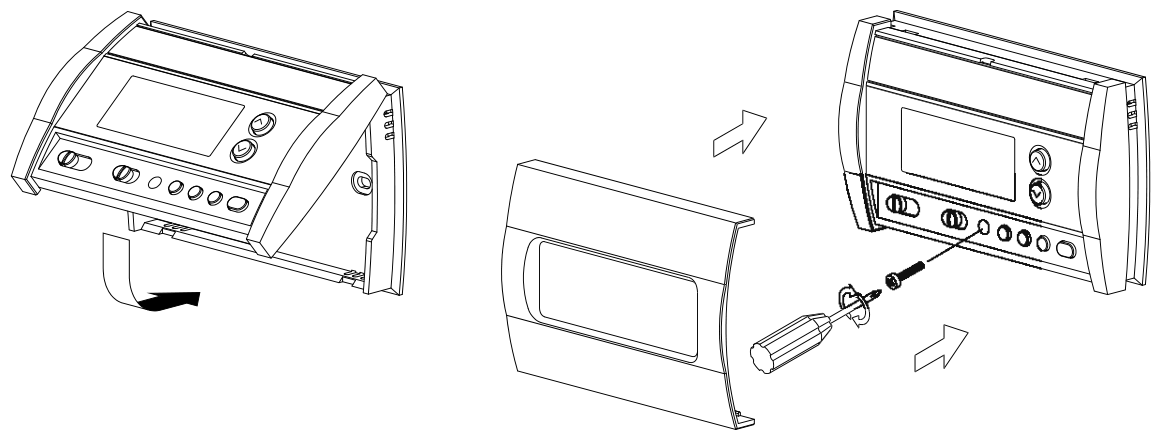
  1. Lift up the front cover to reveal the battery cover.
  2. Remove the battery cover by pressing down and sliding it out.
  3. Insert the two AA LR6 alkaline batteries supplied with the thermostat, watching the orientation on page 2; the screen then displays information and the unit is ready.
  4. Replace the cover by sliding it firmly back.

The cells are alkaline LR6, and used ones are to be disposed of carefully.

Step 2: Setting the Date and Time

Move the slider to DATE. SET THE DAY appears and the day digits flash; the up or down arrow shows DAY OK? while pressed, and the green button confirms. The month and year follow the same way, and an invalid date returns the thermostat to the start of the mode.

The time digits then flash with SET THE TIME. Each press moves one minute, and holding the button changes the time slowly and then progressively quicker. CHANGES SAVED appears, then DATE COMPLETE; moving the slider before that point discards the changes.

Step 3: First Run

With the date and time set, move the slider to AUTO and the built-in program runs. The booklet describes no pairing or commissioning procedure for the radio link.

Programming the Six Periods

The built-in program has six temperature level changes, settable between 3.00am and 2.50am, each level between 5°C and 35°C in 0.5°C increments. The default program is printed on page 5.

Period 1 2 3 4 5 6
Time 6:30 8:00 12:00 14:00 18:00 22:30
Temperature 21°C 18°C 21°C 18°C 21°C 16°C

Move the slider switch to PROG and use the left and right arrows to move between the six periods; a flashing square at the bottom of the screen marks the current one.

Changing a Period

The screen shows SET TIME 1 with the time flashing. Press an arrow and TIME 1 OK? appears; holding the button changes the time quickly, and if the next change period flashes, that next change is pushed forward if you keep pressing. The green button confirms and SET TEMP 1 follows; adjust until TEMP 1 OK? appears, confirm, and SET TIME 2 follows. Repeat for all six periods, or move the slider to AUTO at any point. Ten minutes without input brings MOVE THE SLIDER on screen.

Any period from 2 to 6 can be disabled. In PROG, reach it with the left and right arrows, check the flashing square, then hold the enquiry button for at least 2 seconds. To restore one, navigate to it, where the screen shows DISABLED, and hold the same button until ENABLED appears.

Operating Modes and the Holiday Function

AUTO, MAN and OFF

AUTO follows the temperature program, default or personalised, which the booklet calls the best way to maintain comfort while maximising energy savings. MAN acts as a simple thermostat with a fixed setpoint, adjustable from 5°C to 35°C and held until another mode or temperature is selected. OFF controls to 5°C by default as frost protection, a value adjusted by calling your installer.

Room, Target and Frost Temperature

In AUTO and MAN the display shows the room temperature with ROOM TEMP. Pressing the enquiry button flashes the target temperature with TARGET TEMP for 5 seconds; in OFF the same button shows FROST TEMP. The up or down arrow overrides the programmed temperature for 5 seconds, ending at the next programmed change. The plus or minus buttons adjust the clock, confirmed with the green button.

The Holiday Function

The holiday function holds a constant temperature, 10°C by default, for 1 to 99 days, saving energy and related costs while the home is empty. In AUTO or MAN, press the holiday button: the day after the current day is selected with RETURN DATE OK?, and the plus or minus buttons set 1 to 99 days. The green button confirms, then TEMP OK? allows 5°C to 35°C. HOLIDAY MODE stays displayed until the return date, the counter dropping by one at midnight, and the thermostat resumes the mode set on the slider. Press the holiday button again, or move the slider, to cancel.

User Parameters, Cooling and the HC60NG

The Three User Parameters

Move the slider to OFF, then hold the enquiry button for about 5 seconds; CLOCK SELECT appears with the current setting.

Parameter How to reach it Values Page
Clock select First screen on entering user mode 12 = AM/PM format, 24 = 24hr format 11
Reset program Press the plus time button once 0 = user program, 1 = built-in program 11
Auto change Press the plus time button twice 0 = disabled, 1 = enabled 11

The up or down arrow selects each value, the display flashes, and the green button confirms it; move the slider to exit. Selecting 1 on RESET PROGRAM restores the built-in program and discards the personalised one, and clock select changes how the time is displayed, not the time itself.

Switching to Cooling

Cooling needs a correctly set up system. Press the up and down arrows together for 5 seconds in any mode and COOLING appears. The cooling program uses the same six times with its own temperatures, edited through PROG:

Period 1 2 3 4 5 6
Time 6:30 8:00 12:00 14:00 18:00 22:30
Temperature 24°C 28°C 24°C 28°C 24°C 24°C

The HC60NG Relay Box

The HC60NG is the relay box that receives the radio signal, with a push button and relay status LEDs. The green LED indicates normal operation of the radio frequency system, on when the boiler is on. A red LED, steady or flashing, means radio communication has been lost, which the location of the thermostat may explain, or a radio fault, which is a call to the installer. While communication is lost the boiler can be switched with the push button.

Troubleshooting: The Eight Entries

Pages 12 and 13 print eight entries in three columns, Symptom, Possible Cause and Remedy, four on each page, several with more than one cause. They appear in the booklet’s order and grouping, with icons named as the battery, flame and spanner symbols.

Symptom Possible cause Remedy
The thermostat has a blank LCD screen. Batteries not installed. Check to see if there are batteries in the battery compartment and the paper tab has been removed.
Incorrect battery orientation. Check that the batteries have been installed in the correct orientation.
Exhausted batteries. Replace with new batteries.
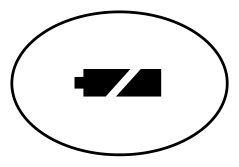
The thermostat shows a flashing battery symbol on the LCD screen. Batteries are exhausted and need replacing. Replace with new batteries.
The thermostat’s LCD display shows a flame symbol but the heating does not switch on. The heating is not required at this moment. The heat demand is sent to the HC60NG as a value between 0-100%. The HC60NG will adjust the boiler on time to meet this requirement. That is why the heating will be off sometimes even if the flame symbol is displayed. To check if the RF system is communicating properly, press the up arrow button to increase the set temperature a few degrees above the current temperature. The heating should come on after a few seconds.
The thermostat shows a flashing spanner symbol on the LCD screen. Fault in thermostat. Remove and re-insert the batteries in the thermostat. If the spanner symbol does not clear itself in a few minutes, call the installer.
The thermostat’s LCD display works but the heating does not switch on (HC60NG LEDs are off or green one is on). No power to heating system. Check that there is power to the heating system.
Program does not call for heat. Move the slider switch to MAN and press the up arrow to increase the temperature a few degrees above the current room temperature. The heating should come on after a few seconds.
Wrong electrical connection. Call electrical installer to check the boiler and HC60NG power supply as well as the connection between the boiler and the HC60NG.
The red LED on the HC60NG is constantly on or flashing. RF communication lost due to the wrong location of the thermostat. Hook the thermostat back on the wall bracket or replace the thermostat on the table stand in the position where RF communication was reliable.
RF communication fault. Call installer. Note: you can control the boiler manually when the RF communication is lost. Press the HC60NG push button to switch the boiler on and off. When the green LED is on, the boiler is on.
Heating switches ON or OFF too slowly or quickly. The thermostat not set correctly for your system. Call Installer.
Temperature swings between too hot and too cold. The thermostat not set correctly for your system. Call Installer.

Frequently Asked Questions

How long do the batteries last and how do I change them?

About two years. A flashing battery symbol shows when power is running low, and the cells are changed by following the battery steps on page 3 with new AA LR6 cells.

Can I hold one temperature all day?

Yes. Move the slider to MAN and set the temperature with the arrows, 5°C to 35°C in 0.5°C steps; it is held until another mode or temperature is selected.

What is Optimum Start?

A function that starts the heating earlier on cold days and later on warmer ones, to save energy. If it is in use, enter the times you want to be warm, not the times you want the boiler to fire. The booklet lists it as an installer option.

Where can I put the thermostat if I use the table stand?

Where reliable radio communication has been proven, with your installer checking the spot. The unit measures the temperature of the room it is in, so keep it away from draughts, sunlight and heat sources, 30 cm from metal and 1 metre from other electrical equipment.
Honeywell The Round CT87K Owner's Manual

Honeywell The Round CT87K Owner’s Manual (PDF)

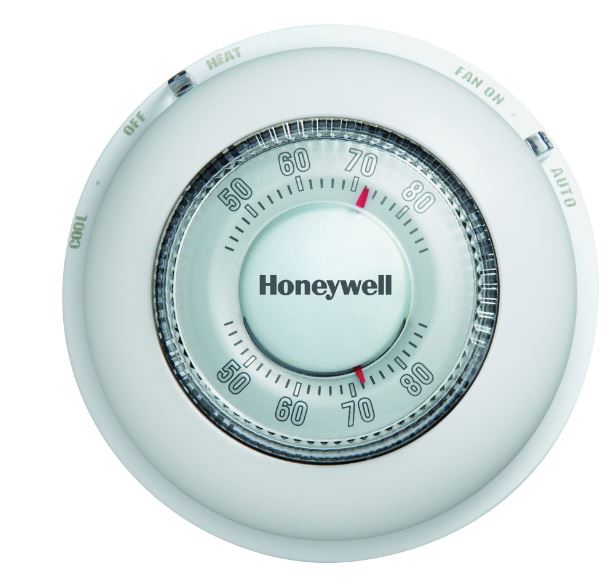
The Honeywell CT87K Owner’s Manual is the official installation-and-operation booklet for Honeywell’s classic “The Round” non-programmable, dial-operated room thermostat. The document number is 69-1959EFS-02, a 16-page trilingual guide (English on pages 1-5, French on 6-10, Spanish on 11-15). It covers two physically similar models together: the CT87K for 24 VAC heating systems, and the CT87N for 24 VAC heating and cooling systems. If your wall dial only has an R and a W connection and no system or fan switch, the CT87K sections are the ones you need.

The CT87K is a mechanical setpoint dial, not a digital programmable thermostat. You set the temperature by rotating the round face; there is no schedule, no app, and no keypad. That simplicity is exactly why it is still installed in a lot of homes and small commercial spaces, and why the manual itself is short. The whole booklet fits on five English pages: package contents, removal of the old unit, wallplate mounting, wiring by terminal, two small configuration switches, and a one-line operating instruction.

Before wiring anything, verify you have the right model. The manual warns that if your old thermostat has four or more wires (not counting C or C1), you may have bought the wrong replacement for a CT87K. In that situation it tells you to stop and call Honeywell at 1-800-468-1502 for advice.

Key Features of the CT87K

The CT87K’s feature set is deliberately small. Honeywell’s Owner’s Manual and the corresponding retail listing describe a non-programmable, single-stage heat-only dial thermostat with a 24 VAC control circuit, 1-year limited warranty, Premier White housing, 3.69 in x 3.69 in x 1.09 in (94 x 94 x 28 mm) dimensions, and an optional decorative cover plate for hiding old marks. The owner-facing details that matter day to day are:

  • Rotary setpoint dial. Turn the round cover to the temperature you want; the ring shows current and desired indoor temperature.
  • Heat-only operation. The CT87K controls a single heating stage. It has no System switch and no Fan switch; those live on the CT87N sibling.
  • Two configuration switches inside the base. The pair of cycle-rate switches is set once during installation to match your heating equipment (see the table below).
  • Terminal block for R, W, and Y. The CT87K uses Y as the third conductor on a 3-wire hot-water heat-only valve circuit, not for cooling.
  • Optional decorative cover plate. Fits behind the base to hide marks left by the previous thermostat.
  • 24 VAC control power only. The Owner’s Manual lists the CT87K as being for 24 VAC heating systems. Do not install it on a line-voltage electric baseboard circuit.

The CT87N, which shares the manual, is the version to buy when you need heat, cool, and a fan switch as well as the dial.

Document Structure

The English portion of 69-1959EFS-02 runs in a fixed order. Knowing the layout is quicker than scrolling through a preview.

  1. Getting started (page 1). Package contents (thermostat, cover plate, wall anchors and screws, wire labels) and required tools: No. 2 Phillips and small pocket screwdrivers, hammer, level, pencil, and a drill bit sized 3/16 in for drywall or 7/32 in for plaster.
  2. Remove your old thermostat (page 1). Turn off power, remove the cover, leave the old wallplate in place, and check for a sealed mercury tube.
  3. Label wires and remove the old wallplate (page 2). Wrap each wire with the letter label that matches the old terminal, then remove the old wallplate. Includes the “wrong replacement” wire-count check and a table mapping common old-terminal letters to CT87N and CT87K terminals.
  4. Mount the base and connect wires (pages 2-3). Mark screw holes, drill and insert anchors, thread the wires, and tighten the terminal screws. Includes the notes about removing the R-Rc jumper, choosing O versus B on a heat pump, and taping off unused conductors.
  5. Configure the switches (page 4, CT87N sections apply when present). The fan-operation switch has an E and F position; the cycle-rate switches 1 and 2 have a four-row setting table for steam, high-efficiency, gas/oil, and electric systems.
  6. Finish installation (page 4). Snap the thermostat onto the base, restore power.
  7. Operation (page 5). The CT87N has a System switch (Cool, Heat, Off) and a Fan switch (On, Auto). Both models set temperature by rotating the dial.
  8. Warranty. The Owner’s Manual closes with the one-year limited warranty statement.

Wiring and Configuration

The CT87K terminal block carries R, W, and Y. The manual maps the older Honeywell or generic terminal letters to those three. Existing labels connect as follows:

  • R, Rh, 4, or V → new R terminal.
  • W, W1, or H → new W terminal.
  • Y or Y1 or M → new Y terminal.
  • C, X, or B → not used on the CT87K. Wrap the bare end with electrical tape and leave it disconnected.

The manual gives two wiring recipes for the heat-only model. A two-wire heat-only system uses only R and W. A three-wire hot-water heat-only system uses R to R, W to W, and Y to Y, which drives an open/close zone valve. Do not rely on wire color; label by the terminal letter on the old unit.

Cycle rate switches

Inside the base are two small switches, labeled 1 and 2, that set how often the thermostat cycles the equipment. The Owner’s Manual gives one row per heating type:

Heating systemSwitch 1Switch 2
Steam or gravityOnOn
High-efficiency warm air (90% plus), hot water, or heat pumpOffOn
Gas or oil warm air (factory setting)OffOff
Electric warm airOnOff

Set both switches before you snap the cover on, because they are not reachable from the front. If you are replacing an identical CT87K, note the old switch positions in a photo before you remove the wires.

Setting the Temperature

Operation is a single action: rotate the round face to the number that matches the temperature you want the room to hold. The ring shows both the current indoor reading and the setpoint. There is no program, no hold, and no schedule to cancel; the CT87K keeps calling for heat until the room reaches where you turned the dial. If you need a heat/cool/off selection or a fan On/Auto switch, that is the CT87N’s System and Fan switch page in the same manual, not the CT87K.

Important Safety Notices

The CT87K Owner’s Manual carries four safety statements that are worth reading before the screwdriver comes out:

  • Turn the power off first. Step 1 of the removal procedure reads: “CAUTION: TURN OFF POWER to system at the furnace, or at the fuse/circuit breaker panel before you begin.” Do not remove or touch low-voltage wiring until you have confirmed power is off at the equipment.
  • Mercury disposal. The manual’s MERCURY NOTICE says that if your old thermostat contains mercury, you should contact your local waste-management authority for proper disposal instructions rather than placing it in the trash.
  • Lithium / perchlorate cell. The Owner’s Manual states the thermostat contains a lithium battery that may contain perchlorate material and that special handling may apply; it points to the California DTSC perchlorate guidance.
  • Cooling low-temperature caution. The CT87N version of the manual adds: “CAUTION: EQUIPMENT DAMAGE HAZARD (CT87N). Do not operate cooling system when outdoor temperature is below 50°F (10°C).” The CT87K is heat only and does not have that feature, but the same rule applies to any connected cooling equipment.

If you are not comfortable removing the old thermostat, if the wire labels do not line up with the CT87K terminals, or if your existing wiring uses more conductors than the CT87K expects, stop. Call Honeywell at the number in the manual or hire a licensed HVAC technician rather than guessing at a low-voltage connection.

Getting Help

The Owner’s Manual itself directs users to 1-800-468-1502 when the wire count does not match the CT87K’s expected two- or three-conductor heat-only circuit. Honeywell Home (a Resideo brand) also publishes the 69-1959EFS document and a companion Range Stops PDF on its support site under “The Round Non-Programmable Thermostat” listing. If you need the exact English wording for a warranty claim, note the model number (CT87K1004 or your variant), the date of purchase, and the terminal layout you used.

Download PDF: Honeywell The Round CT87K Owner’s Manual.pdf

Honeywell VisionPRO TH8000 Series Installation Manual

Honeywell VisionPRO TH8000 Series Installation Manual

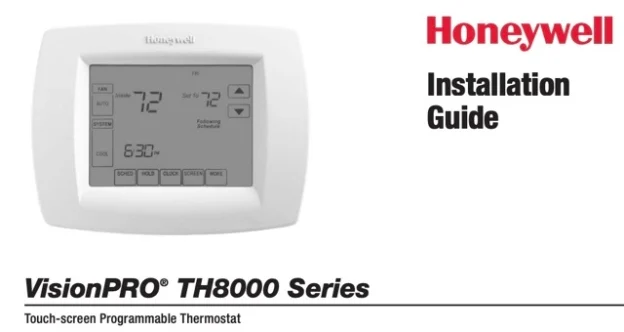
This Honeywell VisionPRO TH8000 Series Installation Manual is the 12-page guide for the touch-screen TH8321U1097, the only model listed on page 1. It covers wiring for conventional, heat pump, and IAQ systems, plus 70+ installer setup functions and system tests. The document is form 69-2389-03, © 2011 Honeywell International Inc.

Download Manual (PDF)

Table of Contents

What the Manual Covers

Page 1 lists one model: “TH8321U1097: For up to 3 Heat/2 Cool heat pump or up to 2 Heat/2 Cool conventional systems with dehumidification, humidification, or ventilation”. To find your model number, “(Pull thermostat from wallplate and turn over to find model number)”. This VisionPRO TH8000 wiring guide covers the TH8321U installation for touch-screen programmable control.

The manual opens with three notices: a perchlorate warning for the lithium battery, a mercury notice if replacing an old control, and an electrical hazard caution: “Can cause electrical shock or equipment damage. Disconnect power before beginning installation.” The guide states: “Must be installed by a trained, experienced technician”.

Before You Install

Page 2 covers wallplate installation. “Separate wallplate from thermostat.” Mount it with “Drill 3/16″ holes for drywall. Drill 7/32″ holes for plaster.” After wiring, “Push excess wire back into the wall opening. Plug wall opening with non-flammable insulation.”

Page 6 shows how to mount the thermostat: “Remove tab. Align pins on back of thermostat with slots in wallplate, then push gently until thermostat snaps into place.” Then set the date and time before entering installer setup.

TH8000 Series Terminal Designations

Page 3 defines terminals for conventional and heat pump systems. Both share R (system power), C (common), S1/S2 (optional outdoor sensor), and U1/U1 (optional IAQ device). These TH8000 Series terminal designations apply to all wiring configurations.

Conventional terminals (page 3)
Terminal Function
R System power. Connect to secondary side of system transformer.
C Common wire from secondary side of transformer.
W 1st stage heat relay.
W2 2nd stage heat relay.
Y 1st stage compressor contactor.
Y2 2nd stage compressor contactor.
G Fan relay.
S1/S2 Optional outdoor/remote/discharge sensor.
U1/U1 Optional IAQ device.
Heat pump terminals (page 3)
Terminal Function
R System power.
C Common wire.
Y 1st stage compressor contactor.
Y2 2nd stage compressor contactor.
E/Aux Auxiliary/Emergency heat relay.
G Fan relay.
L Heat pump reset (powered continuously when System is set to Em Heat; system monitor when set to Heat, Cool or Off).
O/B Changeover valve for heat pumps.
S1/S2 Optional outdoor/remote/discharge sensor.
U1/U1 Optional IAQ device.

Wiring Diagrams for Conventional Systems

Page 4 shows six conventional configurations for VisionPRO TH8000 wiring. Each lists the terminals used and any notes.

Conventional system wiring (page 4)
System Terminals Notes
1H/1C (1 transformer) R W Y G C S1/S2 U1/U1 [1, 6]
Heat Only R W C S1/S2 U1/U1 [1]
Heat Only (Series 20) R W Y C S1/S2 U1/U1 R to Series 20 “R”, W to “B”, Y to “W”
2H/2C (1 transformer) R W W2 Y Y2 G C S1/S2 U1/U1 [1, 6]
Heat Only With Fan R W G C S1/S2 U1/U1 [1, 6]
Cool Only R Y G C S1/S2 U1/U1 [1]

Notes: “[1] Power supply. Provide disconnect means and overload protection as required.” “[2] Optional 24VAC common connection.” “[6] Only works with single transformer systems.”

Heat Pump Wiring Diagrams

Page 5 covers four heat pump configurations for VisionPRO TH8000 heat pump wiring systems.

Heat pump system wiring (page 5)
System Terminals Notes
1H/1C Heat Pump (no aux) R Y G C O/B S1/S2 U1/U1 [1, 3]
2H/1C Heat Pump (with aux) R Y G C E/Aux L O/B S1/S2 U1/U1 [1, 2, 3, 4, 5]
2H/2C Heat Pump (no aux) R Y Y2 G C O/B S1/S2 U1/U1 [1, 2, 3]
3H/2C Heat Pump (with aux) R Y Y2 G C E/Aux L O/B S1/S2 U1/U1 [1, 2, 3, 4, 5]

Notes: “[3] O/B set to control as either O or B in installer setup.” “[4] If L terminal is used, 24VAC common (terminal C) must be connected.” “[5] Heat pump reset (powered continuously when thermostat is set to Em. Heat; system monitor when set to Heat, Cool, or Off).”

IAQ Wiring (Humidification, Dehumidification, Ventilation)

Page 5 also shows six IAQ device configurations, all using the U1/U1 terminals. These indoor air quality connections let you integrate humidifiers, dehumidifiers, and ventilators with the thermostat’s control logic.

IAQ device wiring (page 5)
Device Wiring Notes
Steam humidifier R to U1, U1 to humidifier [7]
Bypass flow-through humidifier R jumpered to U1, U1 to humidifier [7]
Whole house dehumidifier R to U1, U1 to dehumidifier [7]
A/C with low-speed fan R jumpered to U1, U1 to dehumidification terminal [7, 8]
Whole house powered ventilator R to U1, U1 to ventilator [7]
Non-powered ventilator R jumpered to U1, U1 to ventilator [7]

Notes: “[7] Terminals are normally open dry contacts.” “[8] Equipment must include dehumidification terminal for low-speed fan.”

Installer Setup Functions

Pages 7-10 list 70+ VisionPRO TH8000 installer setup functions (0120-0710). The most critical are:

Key installer setup functions (pages 7-10)
Function Setting Options
0170 System type 1-12 (conventional, heat pump, multistage)
0180 Fan control (heating) 0 Gas/Oil, 1 Electric furnace
0190 Changeover valve (O/B) 0 Cooling, 1 Heating
0220 1st stage compressor cycle rate 3 CPH recommended (1, 2, 4, 5, 6)
0240 1st stage heat cycle rate 5 Gas/oil <90%, 1 Steam, 3 Hot water, 9 Electric
0300 Manual/Auto changeover 0 Manual, 1 Auto
0371 IAQ device on U1/U1 0 None, 1 Humidification, 2 Dehumidification, 3 Ventilation
0400 Ventilation control 0-4 (off, on, lockouts)
0580 Compressor protection 5 minutes recommended (0-5)
0600 Heat temperature range stop 90°F max (40-89°F)
0610 Cool temperature range stop 50°F min (51-99°F)

The full list includes date/time (0120-0160), schedule format (0160), energy saving (0165), heat pump type (0173), auxiliary heat (0200), fossil fuel kit (0210), 2nd/3rd stage cycle rates (0230, 0260), backlight (0280), auto changeover deadband (0310), temperature display (0320), daylight savings (0330), remote sensor (0340), dual fuel control (0345-0347), heat pump lockouts (0350-0360), humidification control (0372-0374), dehumidification (0379-0394), ventilation (0401-0432), filter reminders (0500-0520), UV lamp (0520), adaptive recovery (0530), program periods (0540), clock format (0640), extended fan timer (0650-0660), keypad lock (0670), temperature control (0680-0690), display offset (0700-0701), and reset (0710).

Each VisionPRO TH8000 installer setup function controls a specific aspect of system operation. The manual prints factory defaults in bold throughout pages 7-10, so you can see at a glance which settings need changing for your particular installation.

Installer System Test

Pages 10-11 describe seven system tests. Enter test mode by pressing the system button repeatedly until “Test” appears.

System test numbers (pages 10-11)
Test System Status
1 Cooling 0 Off, 1 Compressor/fan on, 2 2nd stage
2 Fan 0 Off, 1 On
3 Heating 0 Off, 1 1st stage, 2 2nd stage, 3 3rd stage
4 Emergency heating 0 Off, 1 On
5 Humidifier 0 Off, 1 On
6 Dehumidifier 0 Off, 1 On
7 Ventilator 0 Off, 1 On

The manual warns: “CAUTION: EQUIPMENT DAMAGE HAZARD. Compressor protection is bypassed during testing. To prevent equipment damage, avoid cycling the compressor quickly.”

Pages 11-12 explain special functions. Auto Changeover (0300) requires heat/cool settings at least 2°F apart (5°F if dehumidification is on).

Remote Sensor (0340) can display outdoor temperature or use a remote indoor sensor. Adaptive Intelligent Recovery (0530) learns how long the system takes to reach setpoints. Compressor Protection (0580) forces a wait before restart.

Dehumidification (0380) on TH8321 models can lower temperature up to 3°F below the cool setting. Heat pump control (0350-0360) sets compressor and auxiliary lockout temperatures. Ventilation (0400-0432) can be locked out by outdoor temperature. Dehumidification Away Mode (0390-0394) controls humidity when the home is unoccupied.

TH8000 Series Specifications and Accessories

Page 12 lists TH8000 Series specifications:

  • Temperature ranges: Heat 40° to 90°F (4.5° to 32°C), Cool 50° to 99°F (10° to 37°C)
  • Operating ambient: 0° to 120°F (-18° to 48.9°C)
  • Shipping: -30° to 150°F (-34° to 66°C)
  • Humidity: 5% to 90% (non-condensing)
  • Dimensions: 4-9/16 in. H x 6 in. W x 1-3/8 in. D (116 mm H x 152 mm W x 35 mm D)
Electrical ratings (page 12)
Terminal Voltage (50/60Hz) Running Current
W 20-30 Vac / 750 mV DC 0.02-1.0 A / 100 mA DC
W2 20-30 Vac 0.02-0.6 A
Y 20-30 Vac 0.02-1.0 A
Y2 20-30 Vac 0.02-0.6 A
E/Aux 20-30 Vac 0.02-1.0 A
O/B 20-30 Vac 0.02-0.6 A
L 20-30 Vac 0.02-0.6 A
U1/U1 20-30 Vac 0.02-0.6 A

Accessories include outdoor sensor C7089U1006, remote indoor sensor C7189U1005, discharge air sensor C7735A1000, ventilators ER200B2006/HR200B1005, fresh air damper EARD6, humidifiers HE265A1007/HM512W1005, and cover plate 32003796-001.

FAQ

How do I find the model number?

“(Pull thermostat from wallplate and turn over to find model number)”. Page 1 lists TH8321U1097 for this TH8321U installation.

What’s the difference between conventional and heat pump terminals?

Heat pump systems add E/Aux (auxiliary/emergency heat), L (heat pump reset/monitor), and O/B (changeover valve). Conventional systems use W/W2 for heat stages and Y/Y2 for cooling stages.

How do I wire an outdoor sensor?

Connect to S1/S2 terminals. In installer setup, set function 0340 to 1 (outdoor sensor display only), 2 (outdoor sensor for control with lockouts), or 4 (discharge air sensor for desert humidity control).

What does the L terminal do?

The L terminal provides “Heat pump reset (powered continuously when System is set to Em Heat; system monitor when set to Heat, Cool or Off).” The wiring notes make the common connection mandatory when this terminal is used.

How do I set up dehumidification?

Set function 0371 to 2 for dehumidification control. For TH8321 models, function 0380 can activate cooling to reduce humidity by up to 3°F below the cool setting. For whole-house dehumidification, wire to U1/U1 and set function 0379 to 3.

What’s the compressor protection setting?

Function 0580 defaults to 5 minutes. The manual states: “Forces the compressor to wait a few minutes before restarting, to prevent damage. During this time, the message ‘Wait’ is displayed.” Options are 0-5 minutes.

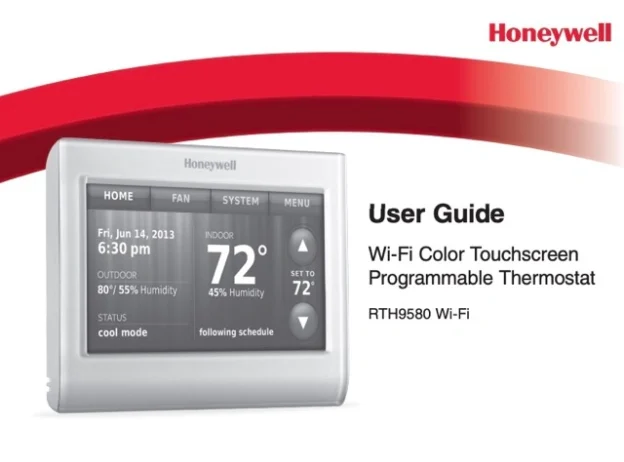
Honeywell RTH9580 Wi-Fi Color Touchscreen Programmable Thermostat User Manual

Honeywell RTH9580 Wi-Fi Color Touchscreen Programmable Thermostat User Manual

The RTH9580WF touchscreen, Wi-Fi thermostat for 24V systems, and it has two requirements that trip people up: it needs a C (common) wire for power, and it is configured through on-screen setup menus rather than a dial. The steps below follow the manual and cite its pages, and the full user guide PDF is linked here.

Download Honeywell RTH9580 Wi-Fi User Guide (PDF)

Table of Contents

What the RTH9580WF Is

The RTH9580WF is a Wi-Fi, color-touchscreen, programmable thermostat for residential or light-commercial use. From the guide’s overview:

  • Touchscreen controls. HOME, FAN, SYSTEM and MENU are touch keys; a tap raises or lowers the setpoint and lets you place a temporary or permanent hold.
  • Selectable schedule. Program schedules run two or four periods per day (you choose during setup), and the thermostat supports both home and business modes.
  • Wi-Fi and app. It connects to your wireless network so you can set it up and adjust it remotely after registration.
  • Runs on 24VAC. It fits forced-air, hydronic and heat-pump systems, and it requires a C wire for power.

Before You Install

  • Confirm the RTH9580WF fits your system. It runs 24V systems such as forced air, hydronic, heat pump, oil, gas and electric; it will not work on millivolt systems such as a gas fireplace, or on 120/240V electric baseboard heat.
  • You must have a C wire. The guide states the C (common) wire is the power source and, without it, the thermostat will not power up (p.11). If no C terminal is used on your old thermostat, review the alternate-wiring options before you proceed.
  • Turn off power at the breaker or the system’s service switch.
  • Photograph the existing wire connections before you disconnect anything; the guide asks you to keep this picture for wiring the new unit (p.9).
  • Label each wire with its terminal letter using the supplied labels. Match by letter, not by wire color.
  • If the old thermostat contains mercury in a sealed tube, do not bin it; the guide points to the Thermostat Recycling Corporation at thermostat-recycle.org.

Wiring and the C-Wire

Wire the new base by matching your labeled wires to the same-letter terminals, then check a few specific cases the guide calls out (pp.9–11):

  • C. Connect the C (common) wire; it supplies the 24VAC power the Wi-Fi thermostat needs.
  • R and Rc. If your old thermostat had both R and RH wires, connect R to the Rc terminal, RH to the R terminal, and unplug the jumper loop between R and Rc.
  • Heat-pump O/B. If you have separate O and B wires, attach the B wire to the C terminal as the guide’s alternate-wiring note directs; confirm the changeover-valve type later in System Setup.
  • Anything you do not use. Cap unused wires with the supplied labels or tape so they cannot touch.

The manufacturer’s own wiring video and the Special-wiring tables cover cases the short steps do not, so use them when your terminals look different.

System Setup and Wi-Fi

After power is restored, the on-screen setup screens tell the thermostat what it is controlling. Set the items on the System Setup screens to match your equipment: your system type, your thermostat controls (heat-only or heat and cool), your fan control, and, for heat pumps, the type of changeover valve (pp.65–66). Then set the date and time and start your program schedule.

For Wi-Fi, use the setup to join your wireless network and register the thermostat. The guide notes an enrollment code is created at registration so you can link the unit in the companion mobile app.

Using the Thermostat

  • HOME / FAN / SYSTEM / MENU. The main touch keys for the screen, fan mode, system mode and options.
  • System modes. Heat, Cool, Off, and on heat pumps an Emergency Heat option; choose a mode with SYSTEM.
  • Auto changeover. For climates where you may need heating and cooling on the same day; enable it on the changeover screen under Advanced Preferences.
  • Holds. Tap to change the temperature for a temporary hold until the next period, or set a permanent hold; a vacation hold is also provided.
  • Schedules. Program four periods per day (wake, leave, return, sleep) for the weekday and weekend patterns.

Comfort Features

  • Smart Response Technology (home mode) learns how long your system takes to reach a setpoint so it arrives on time.
  • Compressor protection holds the compressor for about 5 minutes after a change; the screen shows “Wait” (p.59).
  • Furnace filter reminder prompts you to change the filter on the interval you set.
  • Equipment status screens show what the thermostat is calling for at a glance.

Troubleshooting

These are the guide’s own troubleshooting items (pp.71–72). Use them before assuming a fault.

Problem What the guide says to do
Display is blank Reset the circuit breaker; confirm the system power switch is on and the furnace door is closed; make sure the C wire is connected.
Cannot change the system to Cool Set the System Setup “Your thermostat controls” / “Your system type” to match your equipment.
Fan does not run when heating Set the System Setup “Your fan control” to match your heating equipment.
“Wait” appears Compressor protection is active. Wait 5 minutes for the system to restart.
Heat pump blows cool air in heat mode (or warm in cool mode) Check the System Setup “Type of changeover valve” so it matches your heat pump.
Heating or cooling does not respond Touch SYSTEM and set Heat (temperature above indoor) or Cool (below indoor); check breaker, power switch and furnace door; wait out the “Wait” delay.

Specifications

  • Type: Wi-Fi color-touchscreen programmable thermostat.
  • Power: 24VAC; a C (common) wire is required.
  • System fit: forced air, hydronic and heat pumps (24V); not for 120/240V electric baseboard.
  • Modes: Heat, Cool, Off; Auto changeover; Emergency Heat on heat pumps.
  • Schedule: four periods per day; home and business programs.
  • Features: Smart Response, compressor protection, filter reminder, remote access after registration.
  • Backup: a coin-cell battery keeps settings through outages.
  • Warranty: limited (see the guide); for help use the Customer Assistance section (honeywell.com/yourhome).

FAQ

Does the RTH9580WF need a C wire?

Yes. The guide states the C wire is the power source and the thermostat will not power up without it. If you lack one, review the alternate-wiring options first.

Can I control it from my phone?

Yes. After you join a Wi-Fi network and register the thermostat, an enrollment code lets you link it in the companion app for remote adjustment.

Does it work with a heat pump?

Yes, single-stage heat pumps. You set the changeover-valve type in System Setup, and there is an Emergency Heat mode for heat pumps with auxiliary heat.

Why does the screen say “Wait”?

Compressor protection. The thermostat delays the compressor about 5 minutes after a change to prevent short-cycling (p.59).

How many programs does it run?

Four periods per day (wake, leave, return, sleep), with weekday and weekend patterns, in either a home or business schedule.

Honeywell RTH230B Programmable Electronic Thermostat Installation and User Guide

Introduction

The RTH230B programmable thermostat can be used to control:

  • a gas, fuel oil or electric furnace – 2 or 3 wires
  • a central air conditioner – 2 or 3 wires
  • a hot water system with or without pump – 2 wires
  • a millivolt system – 2 wires
  • a central heating and cooling system – 4 or 5 wires

Note: This thermostat is not compatible with heat pumps or multi-stage systems.

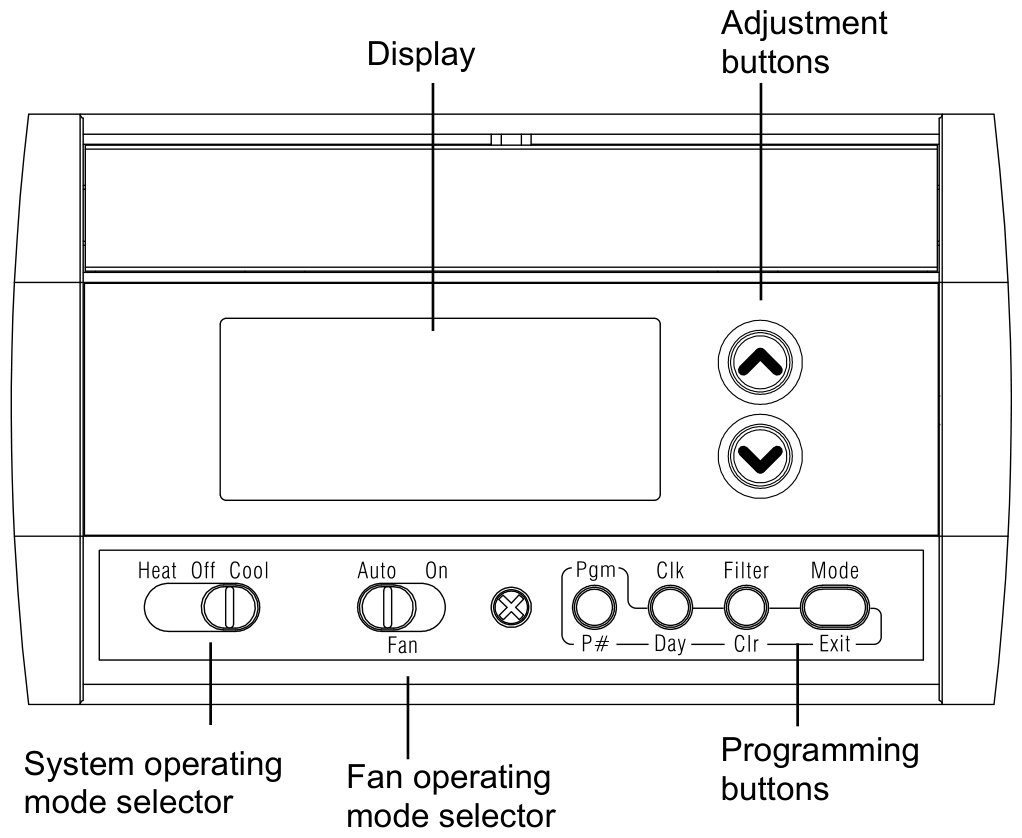
RTH230B front panel with the display, adjustment buttons, system and fan operating mode selectors and programming buttons
Front panel: display, adjustment buttons, system and fan operating mode selectors, programming buttons.

Features

  • System operating mode selection: heat, cool or off
  • Fan operating mode selection: automatic or on (continuous)
  • Programmable heating and cooling cycle lengths: 10, 12, 15, 20 or 30 minutes
  • Temperature display in °F or °C
  • Battery replacement indicator
  • 5-2 programming including:
    • Preprogrammed energy-saving schedule
    • Early Start
    • Temporary bypass
    • Time display (12 h or 24 h)
  • Filter replacement indicator

Installation

WARNING — Risk of electric shock. In order to avoid any risk of electric shock, cut power to the heating system.

2.1 Removing the old thermostat

  1. Remove the old thermostat to access the wires.
    Warning: If the old thermostat was mounted onto an electrical box, it was probably powered by 120/240 volts. In this case, this thermostat cannot be used.
  2. Identify and label each wire (with the corresponding letter on the wire terminal) and remove them from the terminals.
  3. If necessary, strip the end of each wire (maximum of 1/4 inch).
  4. Wrap the wires around a pencil to prevent them from falling into the wall.
  5. If the hole in the wall is too big, insulate it using a non-flammable material in order to avoid air draughts behind the thermostat.

2.2 Installing the new baseplate

For a new installation, choose a location approximately 5 feet (1.5 m) above the floor and on an inside wall. Avoid draughty areas (top of staircase, air outlet, etc.), dead air spots (behind doors), direct sunlight or areas near concealed pipes or chimneys.

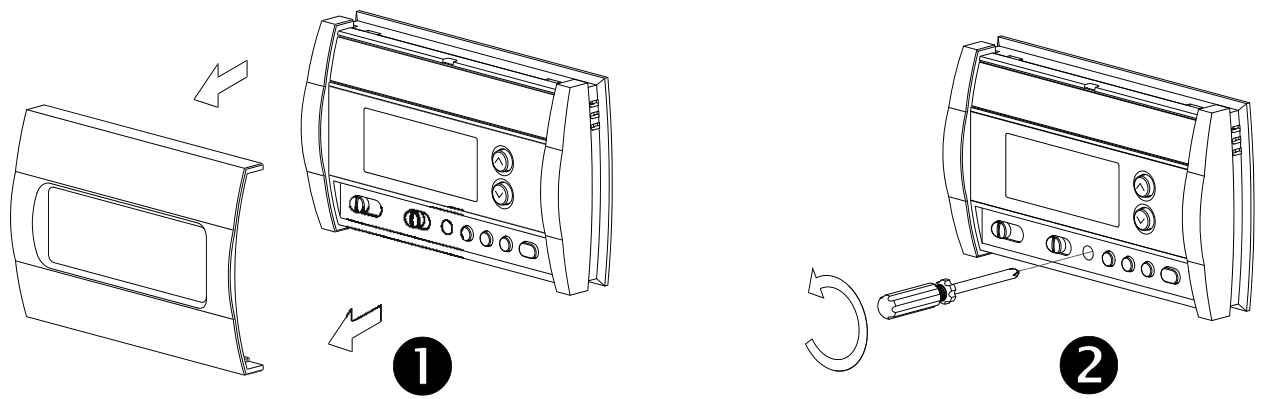
Steps 1 and 2 of installing the new baseplate: removing the faceplate and loosening the locking screw
Steps 1–2: the faceplate is removed, then the locking screw is loosened to separate the thermostat from its baseplate.
  1. Remove the thermostat faceplate.
  2. Loosen the locking screw to separate the thermostat from its baseplate (the screw cannot be completely removed).
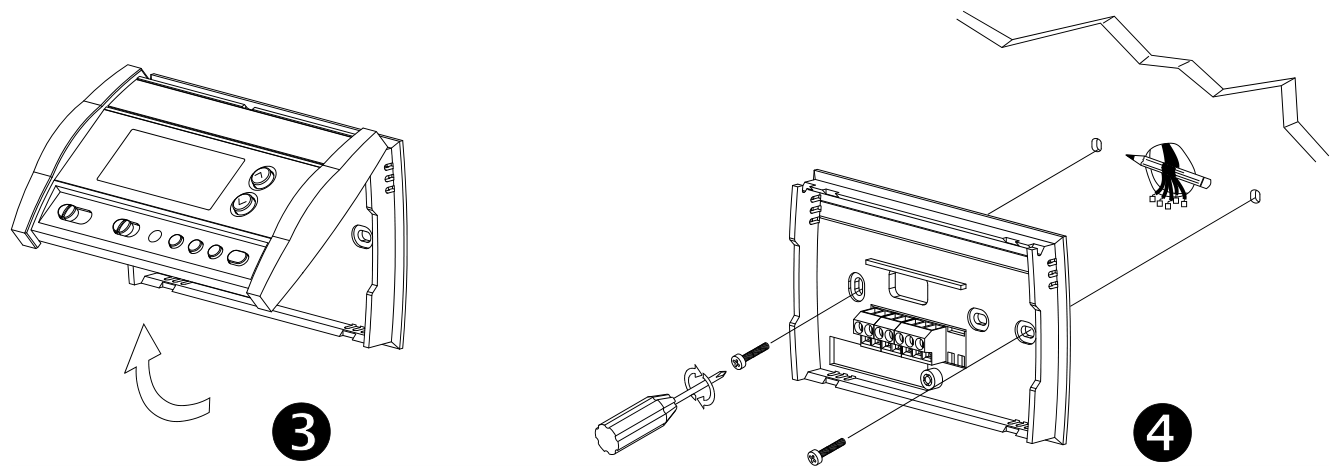
Steps 3 and 4: tilting the thermostat upwards and marking the mounting holes
Steps 3–4: tilt the thermostat upwards, then mark and bore the mounting holes and insert the plastic anchors.
  1. Tilt the thermostat upwards.
  2. Mark and bore the appropriate mounting holes (or use the existing holes). Insert the plastic anchors.
  3. Pass the wires through the opening of the baseplate and fix the baseplate to the wall using the screws provided.

2.3 Connecting the thermostat

The connection of the new thermostat should be similar to that of the old thermostat; however, it can vary depending on the installation.

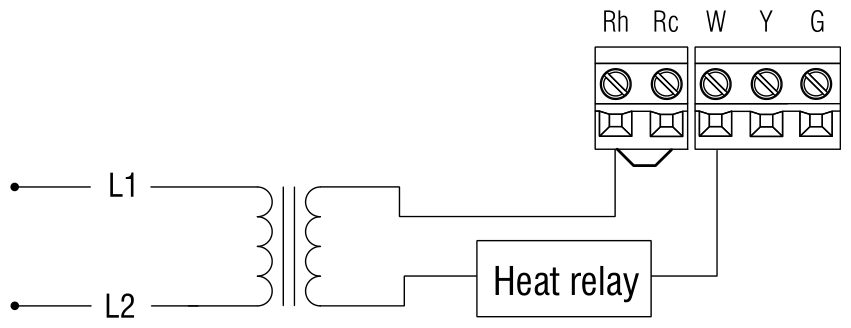
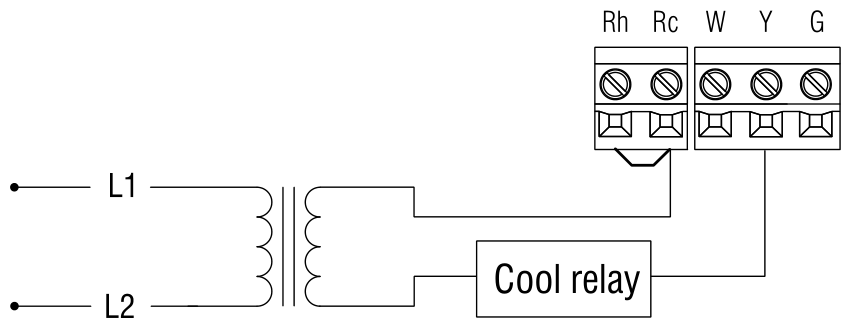
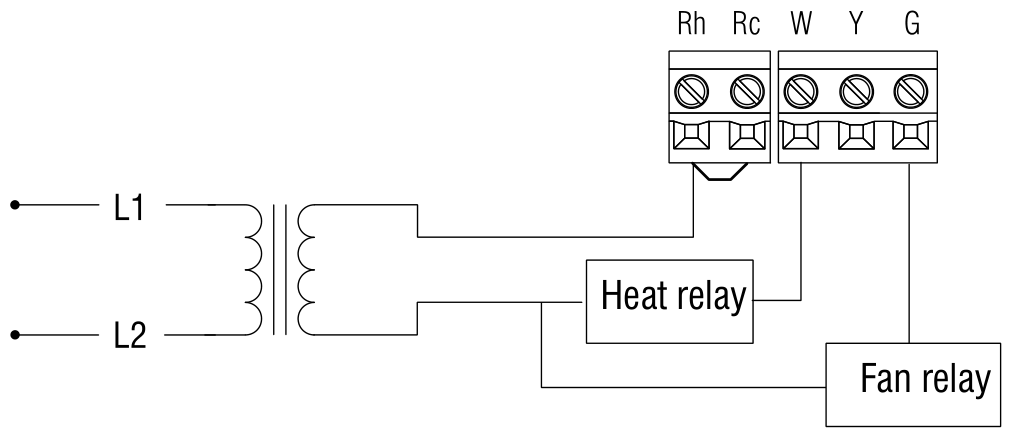
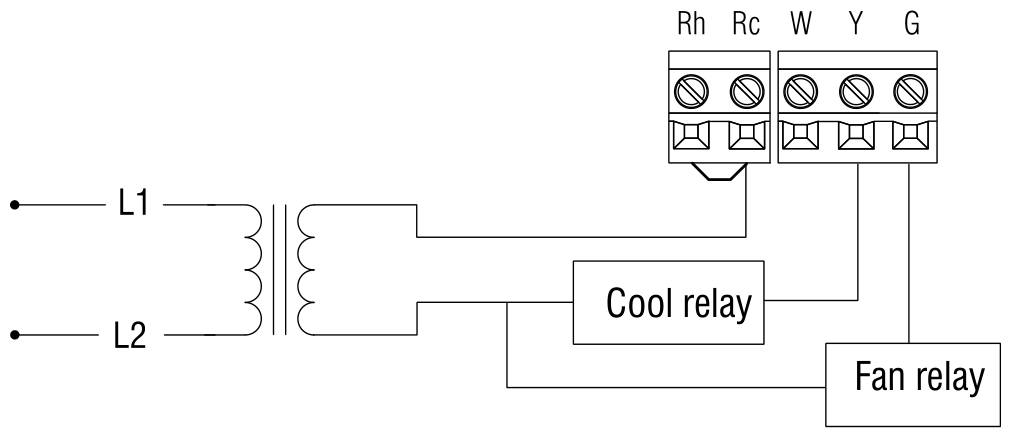
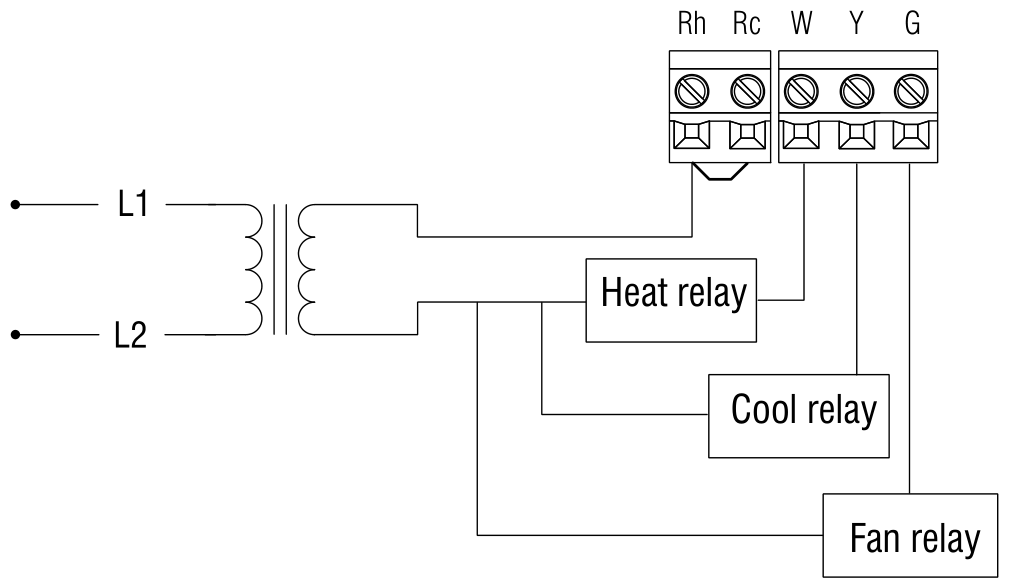
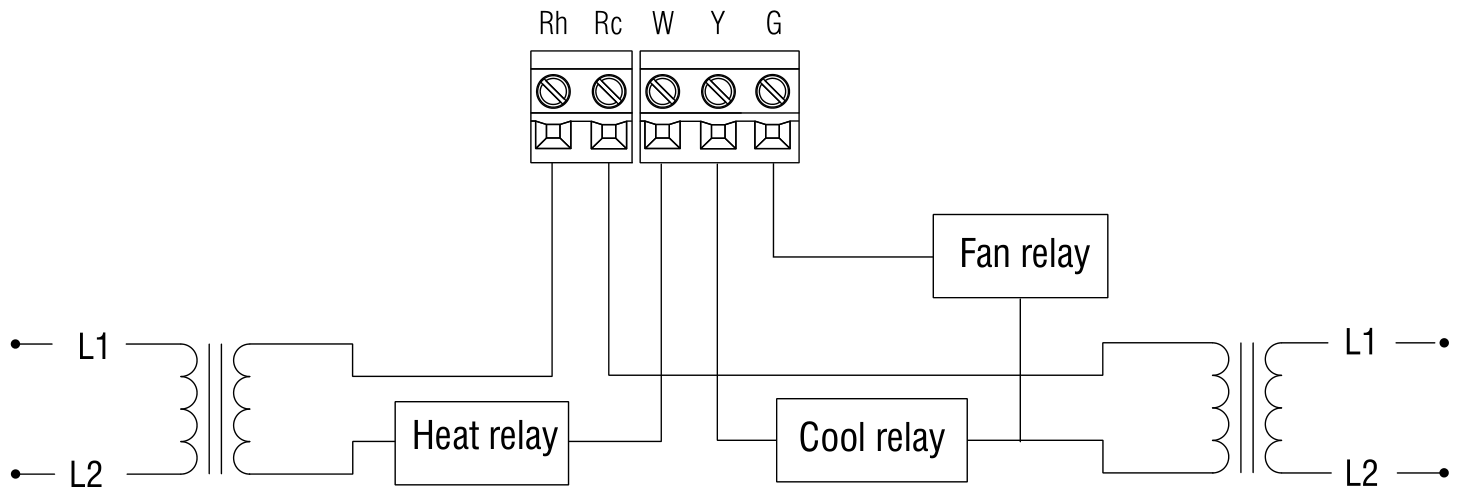
Rh Heating power supply
Rc Cooling power supply
W Heating signal
Y Cooling signal
G Fan

Note: The red jumper wire between the Rc and Rh terminals must be removed in 2- or 5-wire installations. The jumper must be used in 3- or 4-wire installations if you wish to use the mode selector switch for the fan.

2.3.1 2-wire heating

Wiring diagram for a 2-wire heating system: L1 and L2 through the transformer to Rh and W

2.3.2 2-wire cooling

Wiring diagram for a 2-wire cooling system: L1 and L2 through the transformer to Rc and Y

2.3.3 3-wire heating

Wiring diagram for a 3-wire heating system with heat relay and fan relay

2.3.4 3-wire cooling

Wiring diagram for a 3-wire cooling system with cool relay and fan relay

2.3.5 4-wire heating and cooling

Wiring diagram for a 4-wire heating and cooling system with heat relay, cool relay and fan relay

2.3.6 5-wire heating and cooling

Wiring diagram for a 5-wire heating and cooling system with two transformers, heat relay, cool relay and fan relay

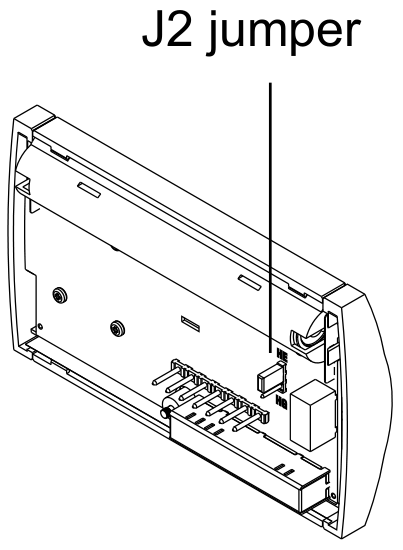
2.4 Setting J2 jumper

The jumper defines the fan operation when the fan is placed in automatic mode.

Location of the J2 jumper on the back of the thermostat baseplate
Location of the J2 jumper.
J2 jumper Setting
HE Use this setting if you have an electric furnace. In this setting, when the fan is placed in automatic mode, it works only when heating or cooling is activated.
HG Use this setting if you have a gas or fuel oil furnace. In this setting, when the fan is placed in automatic mode, it works as follows:
  • When the thermostat is placed in cool mode, the fan works only when cooling is activated.
  • When the thermostat is placed in heat mode, the fan is controlled by the furnace fan control circuitry.

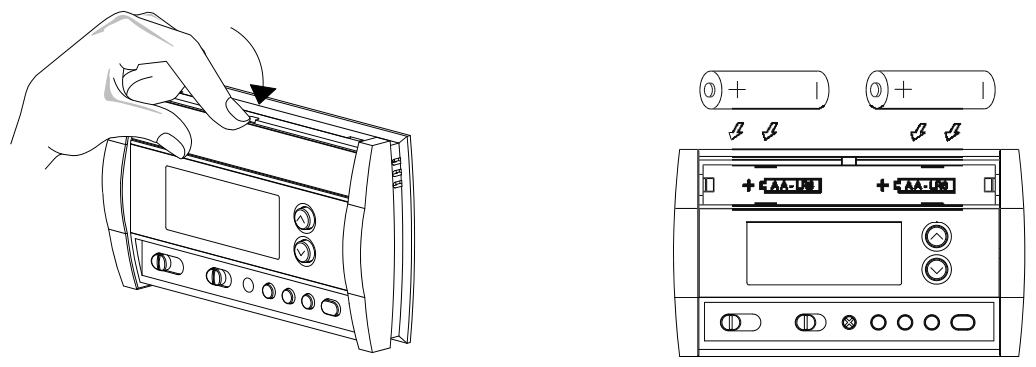
2.5 Installing the batteries

Removing the battery cover and installing two AA batteries in the polarity shown
Pulling out the battery cover and installing the batteries in the polarity shown.
  1. Pull out the battery cover.
  2. Install the batteries as shown. Observe the polarity.
  3. Reinstall the battery cover. You will hear a clicking sound.

After the batteries are installed, the thermostat performs a series of tests for approximately 5 seconds.

Afterwards, the screen displays the actual temperature. It is normal that the displayed temperature be higher than the ambient temperature if you are holding the thermostat. The thermostat will display the ambient temperature once it is installed on the wall. By default, the setpoint is 70°F (21°C).

2.6 Completing the installation

Mounting the thermostat on the baseplate, securing it with the locking screw and installing the faceplate
Mounting the thermostat on the baseplate and installing the faceplate.
  1. Once the baseplate and the batteries are installed, mount the thermostat on the baseplate.
  2. Secure the thermostat using the locking screw and install the faceplate.
  3. Apply power back to the system.

Basic functions

3.1 System operating mode

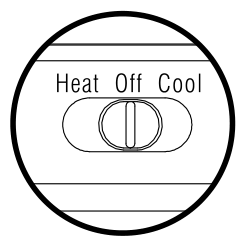
Use the selector switch to place the system in Heating mode (HEAT) or Cooling mode (COOL), or to set the system off.

System operating mode selector with Heat, Off and Cool positions

Note: When you place the thermostat in Cooling mode, you might need to wait up to five minutes before cooling can start. This is a safety feature for the compressor. A snowflake icon will flash on the screen until cooling can start again.

3.2 Fan operating mode

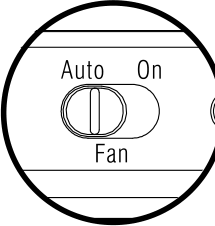
Use the selector switch to set the fan to automatic mode (AUTO) or continuous mode (ON).

Fan operating mode selector with Auto and On positions

Note: This switch is not used if you have a 2-wire installation as the fan is not connected to the thermostat.

Setting Fan behavior in automatic mode
AUTO
  • If you have an electric furnace (see section 2.4), the fan works only when heating or cooling is activated.
  • If you have a gas or fuel oil furnace (see section 2.4), the fan works as follows:
    • When the thermostat is placed in cool mode, the fan works only when cooling is activated.
    • When the thermostat is placed in heat mode, the fan is controlled by the furnace fan control circuitry.
ON The fan is always on.

3.3 Displaying the temperature

The actual temperature is normally displayed. To view the setpoint, press once on one of the ▲ ▼ buttons. The setpoint is displayed for 5 seconds along with the snowflake icon.

Note: Pressing either of the ▲ ▼ buttons more than once will change the setpoint.

3.4 Setting the temperature

Press one of the ▲ ▼ buttons until the desired temperature is displayed.

3.5 Thermostat control mode

3.5.1 Manual/Permanent Hold Mode. Maintains the temperature at a fixed setpoint. To place the thermostat in this mode, press [ Mode ]. The house icon will disappear.

3.5.2 Programmable Mode. Maintains the temperature according to the energy-saving schedule. To place the thermostat in this mode, press [ Mode ]. The current period will be displayed. The four possible periods are:

The four program periods shown as house icons: Wake up, Leave for work, Return home and Sleep

To see the default settings of each period, see section 5.2.

Temporary Bypass. If you modify the temperature (using the ▲ ▼ buttons) when the thermostat is in programmable mode, the new temperature will be used for the next 2 hours. The house icon flashes during the bypass. At the end of the bypass period, the thermostat returns to the temperature settings of the period currently underway.

3.6 Filter replacement indicator

After 500 hours of operation, an icon appears to indicate that the filter needs replacement. Once the filter is replaced, press [ Filter ] for 3 seconds to remove the icon and reset the counter.

Filter button on the thermostat

3.7 Battery replacement indicator

An icon appears when the batteries need replacement. This icon will flash for 120 days, then the thermostat will cut power to the heating/cooling unit. The icon disappears once the batteries are replaced.

Low battery icon shown on the thermostat display

After replacing the batteries, readjust the time and day (see section 5.1). However, the temperature and program settings are saved and do not need to be re-entered.

Warning: Before removing the batteries, place the system switch on the thermostat to Off. Otherwise, the heating/cooling unit might still be running even after the batteries are removed.

4. Configuration menu

  1. To access the configuration menu, press both ▲ ▼ buttons simultaneously for 3 seconds.
  2. To go to the next parameter (menu item), briefly press both ▲ ▼ buttons simultaneously.
  3. To modify a parameter, press one of the ▲ ▼ buttons.
  4. Repeat steps 2 and 3 if necessary.
  5. Press both ▲ ▼ buttons simultaneously for 3 seconds to exit the configuration menu.
Display Description Default Options
°F °C Temperature display °F °C or °F
Hr Time display 12 h 12 h or 24 h
ES Early Start 1 Off On or Off
PH Heating cycles per hour 2 4 2, 3, 4, 5 or 6 3
PH Cooling cycles per hour 2 4 2, 3, 4, 5 or 6 4

1 When Early Start is On, the thermostat determines when to start heating or cooling so that the desired temperature is reached at the set time.
2 When either the heating or cooling parameter is displayed, use the system mode selector switch to alternate between the two parameters.
3 For optimal heating control, use the setting that matches your system as follows: 2=30 min (steam, gravity), 3=20 min (hot water, 90%+ high-efficiency furnace), 4=15 min (gas or oil), 5=12 min (alternate setting for gas or oil), 6=10 min (electric).
4 The corresponding cooling cycle lengths are as follows: 2=30 min, 3=20 min, 4=15 min, 5=12 min, 6=10 min

5. Programming

5.1 Setting the time and day

  1. Press [ Clk ]. The hour flashes.
  2. Set the hour using ▲ ▼.
  3. Press [ Clk ]. The minutes flash.
  4. Set the minutes using ▲ ▼.
  5. Press [ Clk ]. The day flashes.
  6. Set the day using ▲ ▼.
  7. Press [ Exit ] to exit.

5.2 Energy-saving schedule

Your thermostat is preprogrammed with an energy-saving schedule. The schedule automatically controls your heating or cooling system by switching from one setpoint to the next according to the preset times.

Period Mode Setpoint Monday to Friday Saturday & Sunday
Wake up Heating 70°F (21°C) 6:00 a.m. 6:00 a.m.
Cooling 78°F (25.5°C)
Leave for work Heating 62°F (16.5°C) 8:00 a.m. —
Cooling 85°F (29.5°C)
Return home Heating 70°F (21°C) 6:00 p.m. —
Cooling 78°F (25.5°C)
Sleep Heating 62°F (16.5°C) 10:00 p.m. 10:00 p.m.
Cooling 82°F (28°C)

To use the schedule, place the thermostat in programmable mode.

5.3 Modifying the schedule

You can program up to 4 periods per day, each period having its own temperature settings. The same program is repeated daily from Monday through Friday and another program is used for Saturday and Sunday. For each period, you can set the start time, the heating setpoint and the cooling setpoint.

Note: If you wish to use only 2 periods, set periods “1 and 4” or periods “2 and 3”. Early Start will not work if you set periods “1 and 2” or periods “3 and 4”.

  1. Press [ Pgm ]. The settings for period 1 are displayed.
  2. Select the program using the [ Day ] button (MO TU WE TH FR appears when the Monday-Friday program is selected or SA SU appears when the Saturday/Sunday program is selected). Press for 3 seconds to select all 7 days.
  3. Set the time (in increments of 15 minutes) using the ▲ ▼ buttons.
  4. Press [ P# ]. The heating or cooling setpoint flashes depending on the position of the Heat/Cool selector.
  5. Set the desired temperature for the displayed period using the ▲ ▼ buttons.
  6. Use the Heat/Cool selector to switch to the other mode (e.g., if you were in Heating mode, switch to Cooling mode). The setpoint for that mode flashes.
  7. Set the desired temperature using the ▲ ▼ buttons.
  8. Press [ P# ] to go to the next period.
  9. Repeat steps 2 to 8 for each of the remaining periods.
  10. Press [ Exit ] to exit.
Thermostat display during programming, labelled with period start time, program days, period number and temperature setting
Display during programming: period start time, program days, period number and temperature setting.

Note: During programming, to skip a period, press [ CLR ] while the period is displayed. For example, in the predefined energy-saving schedule, periods 2 and 3 have been skipped for Saturday and Sunday.

To use the schedule, place the thermostat in programmable mode.

6. Technical specifications

Power supply2 AA batteries
Maximum load1 A @ 24 Vca per output
Setpoint range (heating)41 to 82°F (5 to 28°C)
Setpoint range (cooling)59 to 95°F (15 to 35°C)
Display range23 to 122°F (-5 to 50°C)
Storage temperature-2 to 122°F (-20 to 50°C)
Temperature display resolution1°F (0.5°C)
Accuracy± 1°F (0.5°C)
Heating/cooling cycle lengths10, 12, 15, 20 or 30 minutes (programmable)
Compressor short-cycle protection (minimum off time)5 minutes
Data memorynon-volatile
Dimensions5 in. x 3 in. x 1 in. (127 mm x 75 mm x 28 mm)

7. Warranty

Honeywell warrants this product, excluding battery, to be free from defects in the workmanship or materials, under normal use and service, for a period of one (1) year from the date of purchase by the consumer. If at any time during the warranty period the product is determined to be defective or malfunctions, Honeywell shall repair or replace it (at Honeywell’s option).

If the product is defective,

  1. (i) return it, with a bill of sale or other dated proof of purchase, to the place from which you purchased it, or
  2. (ii) call Honeywell Customer Care at 1-800-468-1502. Customer Care will make the determination whether the product should be returned to the following address: Honeywell Return Goods, Dock 4  MN10-3860, 1885 Douglas Dr N, Golden Valley, MN 55422, or whether a replacement product can be sent to you.

This warranty does not cover removal or reinstallation costs. This warranty shall not apply if it is shown by Honeywell that the defect or malfunction was caused by damage which occurred while the product was in the possession of a consumer.

Honeywell’s sole responsibility shall be to repair or replace the product within the terms stated above. HONEYWELL SHALL NOT BE LIABLE FOR ANY LOSS OR DAMAGE OF ANY KIND, INCLUDING ANY INCIDENTAL OR CONSEQUENTIAL DAMAGES RESULTING, DIRECTLY OR INDIRECTLY, FROM ANY BREACH OF ANY WARRANTY, EXPRESS OR IMPLIED, OR ANY OTHER FAILURE OF THIS PRODUCT. Some states do not allow the exclusion or limitation of incidental or consequential damages, so this limitation may not apply to you.

THIS WARRANTY IS THE ONLY EXPRESS WARRANTY HONEYWELL MAKES ON THIS PRODUCT. THE DURATION OF ANY IMPLIED WARRANTIES, INCLUDING THE WARRANTIES OF MERCHANTABILITY AND FITNESS FOR A PARTICULAR PURPOSE, IS HEREBY LIMITED TO THE ONE-YEAR DURATION OF THIS WARRANTY. Some states do not allow limitations on how long an implied warranty lasts, so the above limitation may not apply to you.

This warranty gives you specific legal rights, and you may have other rights which vary from state to state.

If you have any questions concerning this warranty, please write Honeywell Customer Relations, 1985 Douglas Dr, Golden Valley, MN 55422 or call 1-800-468-1502. In Canada, write Retail Products ON15-02H, Honeywell Limited/Honeywell Limitée, 35 Dynamic Drive, Toronto, Ontario M1V4Z9.

8. Customer assistance

If you have any questions about the operation of your thermostat, please go to www.honeywell.com/yourhome, or call Honeywell Customer Care toll-free at 1-800-468-1502.

Honeywell 69-1800—03 · 03-11 · Printed in U.S.A.

Honeywell CT30 Low-voltage Thermostat Owner’s Manual

Honeywell CT30 Low-voltage Thermostat Owner’s Manual

This page walks through the Honeywell CT30 Low-voltage Thermostat Owner’s Manual (document 69-1808EF). The CT30 is a simple heat-only, non-programmable thermostat that runs on two wires, so the setup is short: check that it matches your system, mount the base, set one adjustment lever, and connect two wires. The steps below are taken from the manual and noted with their page, and the owner’s manual PDF is linked here. Turn off power before you begin.

Download Honeywell CT30 Owner’s Manual (PDF)

Table of Contents

What the CT30 Is

The CT30 is a low-voltage, heat-only, non-programmable thermostat. You set the temperature by moving a lever, and there are no schedules or buttons to program (pp.1,6). The same manual also covers the CT33, which is similar but adds a far-left lever position to turn the system off (p.6). Both are simple replacements for an existing two-wire heat thermostat.

Is It the Right Thermostat? Count the Wires

Before installing, the manual has you count wires. Look at the wires attached to your old thermostat’s terminals, but do not count any wire on a C or C1 terminal (p.2):

  • Two wires: proceed with the installation.
  • Three or more wires: the CT30 may not be compatible. Stop and call Honeywell at 1-800-468-1502 for advice.

In short, the CT30 is for a basic heat-only circuit. It has terminals only for power and heat, so a system with a cooling wire (Y), a fan wire (G) or a separate cooling transformer (Rc) is not a match.

What’s in the Box and What You Need

The package should include the CT30 thermostat, a cover plate, two wall anchors and screws, a caution card, and wire labels. Tools the manual lists (p.1): a screwdriver, a hammer, a pencil, a drill bit (3/16-inch for drywall, 7/32-inch for plaster), and an optional level.

Installation Steps

  1. Turn off power at the heating system or the fuse/circuit-breaker panel. Take off the old cover and thermostat but leave the wallplate and wires in place (p.2).
  2. Check for mercury. If the old thermostat has a sealed tube with mercury, do not bin it; follow the Mercury Notice and your local disposal rules (p.2).
  3. Label and remove. Disconnect the wires one at a time and wrap each with the matching letter label. Ignore wire colors and use only the terminal letters. Remove the old wallplate once every wire is labeled (p.3).
  4. Mount the base. Mark the screw holes, drill (3/16-inch drywall, 7/32-inch plaster), tap in the anchors, and feed the wires through the base (pp.3,4).
  5. Connect the wires (see Wiring below), then set the adjustment lever (see below) and restore power (pp.4,5).

Wiring the CT30

Match each labeled wire to the terminal with the same letter, loosen the screw, wrap the bare wire around the terminal, and tighten (p.4). The CT30 has two terminals.

Terminal Accepts these old-thermostat letters
R R, RH, 4 or V
W W, W1 or H

If the old thermostat has a Y, G or Rc wire, the manual says to stop: this heat-only thermostat cannot use those, so it is the wrong model for that system (p.4). Any unused wire should be capped with tape and kept out of the wall opening.

Setting the Adjustment Lever

On the CT30, separate the cover from the body, remove the plastic insert, and use a pencil to move the adjustment lever to the setting for your heating system. This tunes how the thermostat cycles to your equipment (p.5):

Your system Lever setting
Gas or oil furnace, less than 90% efficiency 0.4
Electric furnace (any type) 0.3
High-efficiency furnace, more than 90% 0.8
Hot water system 0.8
Gas or oil steam or gravity system 1.2

Then align the three cover tabs with the slots and press until the cover snaps in, and restore power (p.5).

Operating the CT30

Operation is manual. Move the lever to raise or lower the desired indoor temperature; there is nothing to program (p.6). On the CT33, moving the lever to the far left turns the heating system off (p.6).

Specifications and Support

  • Type: low-voltage, heat-only, non-programmable thermostat.
  • Control: manual lever for temperature; a set adjustment lever for the furnace type.
  • Connection: two-wire hook-up (R and W).
  • Not for: systems with cooling, a fan wire, or three or more wires.
  • Related model: CT33, same guide, with an off position.
  • Warranty: 1-year limited; Honeywell Customer Care 1-800-468-1502, www.honeywell.com/yourhome (pp.7,8).

For exact dimensions and the wiring diagrams, use the manual; they are shown as figures rather than a spec list.

FAQ

Is the CT30 a programmable thermostat?

No. It is a non-programmable, heat-only model. You set the temperature by moving a lever, and there are no schedules to program.

How many wires does the CT30 need?

Two, not counting any C or C1 wire. If your old thermostat has three or more, the CT30 is probably not the right fit.

Can the CT30 control air conditioning or a fan?

No. It only has R and W terminals. A Y, G or Rc wire means you need a different thermostat.

What does the adjustment lever do?

It matches the thermostat to your furnace type. The manual gives values from 0.3 (electric) to 1.2 (steam or gravity), with 0.4 for a standard gas or oil furnace (p.5).

What is the difference between the CT30 and CT33?

Both are covered by the same guide. The CT33 adds a far-left lever position that turns the heating system off; the CT30’s distinguishing step is the adjustment-lever setting.

Honeywell Pro 3000 Series Non-Programmable Digital Thermostat Installation Manual

Honeywell Pro 3000 Series Non-Programmable Digital Thermostat Installation Manual

Download Honeywell Pro 3000 Series Installation Manual (PDF)

Table of Contents

What the Manual Covers

Page 1 labels the product a “Non-Programmable Digital Thermostat” from the “PRO 3000 Series” and lists two models: “TH3110D1008” and “TH3210D1004”. To find yours, “Turn thermostat over to find model number and date code.”

Page 8 carries the colophon: “© 2020 Resideo Technologies, Inc. All rights reserved.” It also adds, “The Honeywell Home trademark is used under license from Honeywell International, Inc. This product is manufactured by Resideo Technologies, Inc. and its affiliates.”

The English text runs pages 1–8 of a 24-page trilingual PDF; French (pages 9–16) and Spanish (pages 17–24) mirror the same layout. Nothing here programs a schedule.

Wallplate Mounting

Page 1 opens with, “Remove the wallplate from the thermostat by pulling from the bottom, then follow directions below for mounting.” The four steps are literal:

  • “Pull wires through wire hole.”
  • “Position wallplate on wall, level and mark hole positions with pencil.”
  • “Drill holes at marked positions as shown below, then tap in supplied wall anchors.”
  • “Place wallplate over anchors, insert and tighten mounting screws.”

Two drill bit sizes decide the job: 3/16-inch for drywall, 7/32-inch for plaster. The manual also asks you to tap the supplied anchors into the drilled holes before setting the wallplate back over them.

Pro 3000 Series Terminal Designations

Page 2 lists terminals per model. Read them once; every wiring row on page 3 references them by letter.

TH3110D terminals (page 2)
TerminalManual definition
Rc“24 Vac power from cooling transformer”
R“24 Vac power from heating transformer”
C“24 Vac common. For 2 transformer systems, use common wire from cooling transformer.”
W“Heat relay”
Y“Compressor contactor”
G“Fan relay”
O“Changeover valve energized in cooling”
B“Changeover valve energized in heating”

The TH3210D list on the same page keeps C, O, B, G, Y as printed, drops W, splits R into a single “24 Vac power” source (no Rc), and adds three posts unique to that board: Aux “Auxiliary heat relay”, E “Emergency heat relay”, and L “Sends output when set to Em. Heat”. TH3110D installation covers every conventional row; TH3210D is the two-stage heat-pump variant with auxiliary and emergency heat.

Wiring for Conventional Systems

Page 3 lays out seven configurations for Pro 3000 thermostat wiring; five are conventional systems on the TH3110D board. The bracketed numbers in the tables below refer to the nine notes collected in the Wiring Notes section. TH3110D installation covers all five conventional rows.

Conventional system configurations (page 3)
ConfigurationTerminals usedNotes
1H/1C System (1 transformer), TH3110DRc · R · W · Y · G · CR [R+Rc joined by jumper]; [1, 3]
1H/1C System (2 transformers), TH3110DRc · R · W · Y · G · C[1, 2, 3, 4]
Heat Only System, TH3110DRc · R · W · CR [R+Rc joined by jumper]; [1, 3]
Heat Only System with Fan, TH3110DRc · R · W · G · CR [R+Rc joined by jumper]; [1, 3]
Cool Only System, TH3110DRc · R · Y · G · CR [R+Rc joined by jumper]; [1, 3]

Wire gauge comes before the diagrams: “Wire specifications: Use 18- to 22-gauge thermostat wire. Shielded cable is not required.”

TH3210D Heat Pump Wiring

Page 3 also covers two heat pump configurations. The TH3110D handles 1H/1C heat pumps; TH3210D heat pump wiring is required for two-stage auxiliary heat.

Heat pump configurations (page 3)
ConfigurationTerminals usedNotes
1H/1C Heat Pump, TH3110DRc · R · W · Y · G · C · O · BR [R+Rc joined by jumper]; W [W+Y joined by jumper]; [1, 3, 5, 6, 7]
2H/1C Heat Pump, TH3210DR · Y · Aux · E · G · C · O · B · L[1, 3, 5, 8, 9]

On the 1H/1C row, W is not wired on its own — the manual prints it as a field jumper to Y. Pro 3000 Series terminal designations matter here: misreading W for Y2, or O for B, is the most common miswire.

Wiring Notes

Page 3 closes with nine numbered notes keyed to the diagrams:

  1. “Power supply. Provide disconnect means and overload protection as required.”
  2. “Remove jumper for 2-transformer systems.”
  3. “Optional 24 Vac common connection.”
  4. “Common connection must come from cooling transformer.”
  5. “Use either O or B terminals for changeover valve.”
  6. “Use a small piece of wire (not supplied) to connect W and Y terminals.”
  7. “Set fan operation switch to Heat Pump (see page 5) and configure system type for heat pump (see page 6).”
  8. “L terminal sends a continuous output when thermostat is set to Em. Heat. Connect to Honeywell Home zoning panels to switch the panel to Emergency Heat.”
  9. “Install field jumper between Aux and E if there is no emergency heat relay.”

Thermostat Mounting and the Fan Operation Switch

Page 4 walks you back onto the wallplate: “Align the 4 tabs on the wallplate with corresponding slots on the back of the thermostat.” then “Push gently until the thermostat snaps in place.” and finally “Plug wall opening with non- flammable insulation.”

The same page then sets the fan operation switch on the TH3110D board. Gas or oil installs leave it in the factory position: “For gas or oil heating systems, leave the fan operation switch in this factory-set position.” Heat pump or electric heat flips it: “Change the switch to this setting for heat pump or electric heat systems.”

Installer Setup

Page 5 lists seven Pro 3000 installer setup functions on the non-programmable board. To enter setup, press and hold both arrow keys until the display changes; the up key advances the function, the down key changes the setting, and both together exit and save.

Installer setup functions (page 5)
Func.SettingOptions
1System type (TH3110D only)0 Gas, oil or electric heat with air conditioning · 1 Heat pump (5 minute compressor off time in heating and cooling)
5Heating cycle rate (CPH), TH3110D only5 gas or oil under 90% · 1 steam or gravity · 3 hot water or 90%+ · 9 electric · others 2, 4, 6, 7, 8, 10, 11, 12
6Auxiliary heat cycle rate (CPH), TH3210D onlySame option list as function 5
8Emergency heat cycle rate (CPH), TH3210D only9 electric emergency · 1 steam or gravity · 3 hot water or 90%+ · 5 gas or oil under 90% · others 2, 4, 6, 7, 8, 10, 11, 12
9Compressor cycle rate (CPH)3 Recommended for most compressors · other options 1, 2, 4, 5, 6
14Temperature display0 Fahrenheit · 1 Celsius
15Compressor protection5 Five-minute compressor off time · other options 0, 1, 2, 3, 4

Function 15 has a plain-language description on the same page: “Forces the compressor to wait a few minutes before restarting, to prevent damage. During the wait time, the message Cool On or Heat On (heat pumps only) will flash on the display.”

Because the PDF’s text layer drops bold, every option above is listed unmarked. The printed manual marks factory settings in bold on page 5; consult the paper copy before changing anything.

Installer System Test

Page 6 walks the installer through a four-number system test. To start, “Set SYSTEM switch to Heat.” and press the down arrow to bring each system online against the table below; press again until systems turn off. The TH3210D adds one more pass: “Set SYSTEM switch to Em Heat and repeat steps 2-3 above (TH3210D only).” Cool repeats the same cycle. Holding both arrow keys together ends the test at any time.

System test numbers and status codes (page 6)
TestSystemStatus codes
10Heating system0 Heat and fan off · 1 Heat turns on · 2 Auxiliary heat turns on (TH3210D only)
20Emergency heat0 Heat and fan off · 1 Heat and fan turn on · 2 Auxiliary heat turns on
30Cooling system0 Compressor and fan off · 1 Compressor and fan turn on
70Thermostat information (for reference only)71–72 software revision major / minor · 73–74 configuration identification major / minor · 75–76 production date code week / year

Page 8 pairs the test with a warning: “CAUTION: EQUIPMENT DAMAGE HAZARD Compressor protection is bypassed during testing. To prevent equipment damage, avoid cycling the compressor quickly.”

Troubleshooting

Page 7 is a six-symptom checklist. “Most problems can be corrected quickly and easily.”

  • Blank display — check the circuit breaker, the power switch at the heating and cooling system, the furnace door, and that “fresh AA alkaline batteries are correctly installed (see page 2)”.
  • Heat or cool does not respond — set SYSTEM to the matching mode, verify the setpoint is above (heat) or below (cool) the indoor temperature, then “Wait 5 minutes for the system to respond.”
  • Setpoint does not change — the manual prints the accepted range as Heat “40° to 90°F (4.5° to 32°C)” and Cool “50° to 99°F (10° to 37°C)”.
  • Cool On or Heat On flashes — “Compressor protection feature is engaged. Wait 5 minutes for the system to restart safely, without damage to the compressor.”
  • Cool On absent — set the System switch to Cool, set the temperature below current room temperature.
  • Heat On absent — set the System switch to Heat, set the temperature above current room temperature.

Specifications

Page 7’s specifications block prints these ratings:

  • Temperature ranges: Heat 40° to 90°F (4.5° to 32°C); Cool 50° to 99°F (10° to 37°C)
  • Operating ambient: 32° to 120°F (0° to 48.9°C)
  • Shipping: -20° to 120°F (-28.9° to 48.9°C)
  • Humidity: 5% to 90% (non-condensing)
  • Dimensions: 3-13/16 in. H x 5-3/8 in. W x 1-1/4 in. D (97 mm H x 137 mm W x 32 mm D)
  • Input: 24 V~ @ 60 Hz, 1.0 A
Electrical ratings (page 7)
SystemVoltage (50/60 Hz)Running current
Heat (1st stage)20-30 Vac0.02-1.0 A
(Powerpile)750 mV DC100 mA DC
Emergency heat20-30 Vac0.02-1.0 A
Auxiliary heat20-30 Vac0.02-1.0 A
Cooling20-30 Vac0.02-1.0 A

Safety Notices

Page 8 stacks four cautions at the foot of the guide. “CAUTION: ELECTRICAL HAZARD Can cause electrical shock or equipment damage. Disconnect power before beginning installation.” The equipment-damage caution quoted above appears again here, alongside the mercury and e-waste notices that follow.

Two more notices round out the safety page: “If this product is replacing a control that contains mercury in a sealed tube, do not place the old control in the trash.” — the mercury notice — and “The product should not be disposed of with other household waste. Check for the nearest authorized collection centers or authorized recyclers.” — the electronic waste notice.

Support contact on the same page: “For assistance with this product, please visit customer.resideo.com. Or call Customer Care toll-free at 1-800-468-1502.”

FAQ

Which Pro 3000 model is right for my system?

TH3110D1008 covers conventional 1H/1C and 2H/2C installations plus 1H/1C heat pumps using its W and Y terminals. TH3210D1004 adds a dedicated Aux relay and E (emergency heat) terminal for 2H/1C heat pumps with a backup heat source.

Do I need a C wire on the Pro 3000?

The manual describes C as “Optional 24 Vac common connection”, with two-transformer systems using the cooling side: “For 2 transformer systems, use common wire from cooling transformer.” Batteries provide primary or backup power if C is not run.

What does the L terminal do on the TH3210D?

Per wiring note [8], the L post is used for Honeywell Home zoning panels: it sends a continuous output when the thermostat is set to Em Heat, which lets the panel switch to emergency-heat operation.

How do I set up a heat pump on the Pro 3000?

Two switches cooperate. First, set the physical fan operation switch on the TH3110D board to Heat Pump (page 4). Then, in Pro 3000 installer setup, set function 1 to 1 so the thermostat knows to run 5-minute compressor off time in both heating and cooling.

Why won’t my thermostat turn on?

Work through the page 7 checklist. “Display is blank” starts with the circuit breaker and the “power switch at heating & cooling system”. Confirm the furnace door is shut, then check that “fresh AA alkaline batteries are correctly installed”.

What temperature range can the Pro 3000 be set to?

Heat settings run 40° to 90°F (4.5° to 32°C). Cool settings run 50° to 99°F (10° to 37°C). Setpoints outside these bounds simply won’t accept a change.

Honeywell CT2800 Programmable Thermostat installation instructions

Honeywell CT2800 Programmable Thermostat installation instructions 

These notes follow the official Honeywell CT2800 Programmable Thermostat installation instructions (document 69-1638) so you can install, wire and program this weekday/weekend thermostat without guessing. The CT2800 is a 5-2 day, single-stage model, so the compatibility check and the DIP-switch setup matter. Every step below is taken from the printed document and labeled with its step number, and the PDF is linked here. Work with the power off and confirm the manual against your own system.

Download the official Honeywell CT2800 Installation Instructions (PDF)

Table of Contents

What the CT2800 Is

The CT2800 is a digital, wall-mounted programmable thermostat for a low-voltage (20 to 30 VAC) central heating and/or cooling system. Its key traits, straight from the document:

  • Weekday/Weekend (5-2 day) programming. One schedule for Monday to Friday, a separate one for Saturday and Sunday.
  • Up to four periods a day. Wake, Leave, Return and Sleep on weekdays; Wake and Sleep on weekends.
  • Single-stage heat and/or cool. It controls one stage of heating and one stage of cooling.
  • Two AA alkaline batteries. They power the clock and program.

Step 0: Check Compatibility First

The instructions open with a compatibility chart, because the CT2800 only fits certain systems. If yours is not listed as compatible, the chart names an alternate Honeywell model instead (Step “Verify You Have Correct Thermostat”).

Heating/Cooling systemCompatible?Alternate model
Conventional: single-stage warm-air furnace or hot waterYes—
Electric baseboard heat (120 to 240V)NoCT1950 (240V)
Steam boiler with radiatorsNoCT3600
Heat pump (no auxiliary/backup heat)NoCT3600
Multistage heat pump (with auxiliary/backup heat)NoCT3611
Multistage conventional (more than one stage)NoSee a contractor

Read this carefully: the CT2800 is not for heat pumps, steam, line-voltage electric baseboard, or multistage systems. If a label such as O, B, W2, H2 or Y2 is on your old thermostat, the instructions stop the installation and point you to an alternate model.

Before You Start

  • You need two AA alkaline batteries (Honeywell recommends Energizer), a screwdriver, a drill with a 3/16-inch or 7/32-inch bit, a pencil, a level, wire cutter/stripper, and electrical tape.
  • Confirm your heating and cooling equipment works first. A pre-existing problem can outlive the new thermostat.
  • Do not run cooling when the outdoor temperature is below 50°F (10°C), which can damage the compressor.
  • If your old thermostat contains mercury in a sealed tube, the document’s Mercury Notice requires you to recycle it, not bin it.

Installing the Thermostat

The document walks through numbered steps. In order:

  1. Step 2, remove the old thermostat. Turn off power at the furnace or the fuse/circuit-breaker panel. Take off the old cover and mounting plate without disconnecting the wires, then label each wire with the terminal letter (not the color). If the old unit has a C/C1 clock wire, six or more wires, only three wires, five wires, or unused extra wires, jump to the special-wiring notes first.
  2. Step 3, mount the plate. Separate the plate from the body with a coin, level it, mark the holes, and drill (3/16-inch for drywall, 7/32-inch for plaster or wood). Tap in the anchors for drywall, feed the wires through, and tighten the screws.
  3. Step 4, set it for your heating type. Use the FUEL switch on the back for F (gas/oil) or E (electric), then set DIP switches 1 and 2 per the heating-system table (default 1-On/2-On is for a standard warm-air gas/oil furnace; 1-Off/2-On for high-efficiency or hot water; 1-On/2-Off for electric). Turn DIP switch 3 to Off if you want Celsius instead of Fahrenheit.
  4. Step 6, mount. Line up the top tabs and snap the bottom in.
  5. Step 7, batteries. With the System switch Off, insert two AA alkaline batteries with correct polarity. The display lights up with a flashing time, meaning it is ready to program.

Wiring the CT2800

Step 5 matches each labeled wire to the terminal with the same letter on the back of the thermostat. The CT2800 uses five terminals.

TerminalWhat it does
RPower (heating transformer)
RcPower for cooling
WHeat call
YCooling call
GFan

The instructions also state:

  • No C wire. The CT2800 does not use the C terminal. Tape off any unused or clock (C/C1) wires so they cannot touch.
  • R / Rc jumper. A metal jumper sits between R and Rc out of the box. Leave it for a single-transformer system; remove it only for a five-wire system, then run each power wire to its own terminal.
  • Old labels that differ. The cross-reference table maps old terminals such as R, RH, 4 or V to the new R; Rc or R to Rc; W, W1 or H to W; Y or Y1 to Y; and G or F to G. A wire on O or B, or on W2, H2 or Y2, means stop and use another model.

Programming the Weekday/Weekend Schedule

Heating and cooling are programmed separately. Set the System switch to Heat for the heating schedule, then to Cool for the cooling schedule. To start, press SCHEDULE; use the Time buttons to set a period’s time and the Temp buttons to set its temperature, then advance to the next period. Set the weekday periods (Wake, Leave, Return, Sleep), then the weekend (Wake, Sleep), and press RUN to finish.

The document supplies suggested values. For heating: Wake 6:00 AM 70°F (21°C), Leave 8:00 AM 62°F (16.5°C), Return 6:00 PM 70°F, Sleep 10:00 PM 62°F. For cooling: Wake 6:00 AM 78°F (25.5°C), Leave 8:00 AM 85°F (29.5°C), Return 6:00 PM 78°F, Sleep 10:00 PM 82°F (28°C).

A few rules from the text: setpoints cannot go below 45°F (7°C) or above 88°F (31°C); if you skip programming it, the thermostat runs heating at 68°F (20°C) and cooling at 78°F (26°C) around the clock; and an unprogrammed weekend keeps the weekday Sleep temperature until Monday’s Wake.

Controls and Overrides

  • System switch. Cool, Off or Heat.
  • Fan switch. Auto runs the fan only during heating or cooling; On runs it continuously.
  • Temporary override. Press Temp warmer or cooler; a TEMPORARY arrow shows and the change lasts until the next period.
  • Permanent hold. Press HOLD; “HLd” appears and the temperature is held until you cancel with RUN. Use it for a vacation.
  • Check programs. Press SCHEDULE repeatedly to review times and temperatures; press RUN to resume.

The display shows a SYSTEM ON arrow whenever the thermostat is calling for heating or cooling.

In Case of Difficulty

This is the document’s own “If… Then…” list. It is short and specific, so read it before deciding the thermostat is defective.

IfThen (what the manual says)
Display does not come onConfirm fresh batteries are installed correctly; if not, set System to Off, insert the batteries backward for 5 to 10 seconds, then reinstall them the right way.
Flashing “bAt Lo”Batteries are low. Replace them; if it continues, repeat the backward-insert reset.
Setpoint stops at 45°F or 88°FYou hit the programming limit; the range is 45°F to 88°F (7–31°C).
Temperature changes at the wrong timeRecheck that period’s AM/PM, and the current day and time.
Heat or cool will not startSet the System switch correctly, check the fuse/breaker and connections, replace batteries if blank, and allow the built-in cooling delay (about 5 to 10 minutes) before the compressor starts.
Furnace short-cyclesAdjust the anticipator screws on the back of the thermostat.
Displayed room temperature looks off by about 1°Seal the wall hole to stop drafts; small differences are normal and can last up to 30 minutes during recovery.

Specifications

  • Programming: Weekday/Weekend (5-2 day); up to four weekday periods and two weekend periods.
  • System control: Single-stage heat and/or cool.
  • Voltage: 20 to 30 VAC low-voltage systems.
  • Setpoint range while programming: 45°F to 88°F (7°C to 31°C).
  • Unprogrammed default: heat 68°F (20°C), cool 78°F (26°C).
  • Cooling delay: built-in, about 5 to 10 minutes.
  • Power: two AA alkaline batteries.
  • Terminals: R, Rc, W, Y, G; C is not used.
  • Not compatible with: heat pumps, steam, multistage systems, and 120/240V electric baseboard.
  • Warranty: 1-year limited (excludes battery); Honeywell Customer Care 1-800-468-1502.

FAQ

How long is the CT2800 installation?

The document lists seven steps: prepare, remove the old unit, mount the plate, set the fuel and DIP switches, wire, mount the body, and install the batteries, then program the schedule.

Which terminals does the CT2800 use?

R, Rc, W, Y and G. It does not use a C wire, and a pre-installed jumper links R and Rc unless you have a five-wire system.

Can I install the CT2800 on a heat pump?

No. Its compatibility chart lists heat pumps, steam, multistage systems and 120/240V electric baseboard as not compatible, and points to models such as the CT3600 instead.

What do the DIP switches do?

DIP switches 1 and 2 set the heating-system type and the FUEL switch sets gas/oil (F) or electric (E). DIP switch 3 changes the display between Fahrenheit and Celsius.

What happens if I never program it?

It runs a fixed default: heating at 68°F (20°C) and cooling at 78°F (26°C) all day, per the instructions.

Honeywell FocusPRO TH5000 Series Installation Manual

Honeywell FocusPRO TH5000 Series Installation Manual

This Honeywell FocusPRO TH5000 Series Installation Manual guide is for the technician with a non-programmable FocusPRO on the bench and a cable of unknown parentage coming out of the wall. Every terminal list, wiring note, setup function and rating below is quoted from the guide, with the page number attached.

It is eight English pages long and assumes you already know what a transformer does. What you get is a model-to-system map, fourteen wiring configurations, twelve numbered notes and an installer setup table. Read it as a lookup sheet, not a tutorial.

Download Honeywell FocusPRO TH5000 Series Installation Manual (PDF)

Table of Contents

Models and System Types

Page 1 labels the product a “Non-Programmable Digital Thermostat” and names its audience: “Must be installed by a trained, experienced technician”. The warning that follows is why you read the pages — “Failure to follow these instructions can damage the product or cause a hazardous condition.”

The footer document id is 69-1922EFS—03, and page 8 carries “© 2020 Resideo Technologies, Inc. All rights reserved.” — the series is sold through Resideo.

“This manual covers the following models”, and the split is by staging capacity rather than features:

  • “TH5110D: For 1 Heat/1 Cool systems”
  • “TH5220D: For up to 2 Heat/2 Cool systems”
  • “TH5320U: For up to 3 Heat/2 Cool systems (Remove battery holder to find model number)”

Shaded areas in the wiring pages “apply only to TH5320U/TH5220D or as otherwise noted”, so the model decides which rows are live. For FocusPRO TH5110D installation the board carries only Rc, Y, W, G, R and C.

Six system types are in scope: “Gas, oil, or electric heat with air conditioning”, “Warm air, hot water, high-efficiency furnaces, heat pumps, steam, gravity”, “Heat only — two-wire systems, three-wire zone valves (Series 20), and normally open zone valves”, then “Heat only with fan”, “Cool only” and “750 mV heating systems”.

Before You Install

Page 2 leads with a “CAUTION: ELECTRICAL HAZARD” that “Can cause electrical shock or equipment damage. Disconnect power before beginning installation.” The mercury notice covers whatever you just removed: “If this product is replacing a control that contains mercury in a sealed tube, do not place the old control in the trash.”

Wallplate work is “Separate wallplate from thermostat.”, then “Mount wallplate as shown below.”, with hole sizes that depend on the wall: “Drill 3/16” holes for drywall. Drill 7/32” holes for plaster.”

Power options come from page 3: “Connect C for primary AC power (optional if batteries are installed).”, “Insert batteries for primary or backup power.” and “Remove factory-installed jumper only for two-transformer systems.” Page 5 closes the mechanical job — align the four wallplate tabs, “push gently until the thermostat snaps in place.”, then “Plug wall opening with non-flammable insulation.”

Terminal Designations

Page 3 defines the terminals twice: conventional, then heat pump.

Conventional terminals (page 3)
TerminalManual definition
Rc“24VAC power from cooling transformer”
R“24VAC power from heating transformer”
W / W2“Heat relay (stage 1)” / “Heat relay (stage 2)”
Y / Y2“Compressor contactor (stage 1)” / “Compressor contactor (stage 2)”
G“Fan relay”
C“24VAC common. For 2 transformer systems, use common wire from cooling transformer.”

The heat pump list keeps those Rc, R, G and C definitions, calls Y simply “Compressor contactor”, and replaces the heat relays with O/B “Changeover valve” plus Aux “Auxiliary heat relay*”, E “Emergency heat relay*” and L “Sends output when set to Em. Heat”. The asterisk reads “*Aux and E terminals combined on TH5320U only.”

Conventional Wiring Diagrams

Page 4 is the TH5000 series wiring diagram for conventional equipment: nine configurations. Wire gauge comes first — “Use 18- to 22-gauge thermostat wire. Shielded cable is not required.” Every single-transformer row prints Rc “Power [1]” with R “[R+Rc joined by jumper]”; the two-transformer rows print Rc “Power (cooling transformer) [1, 2]” with R “Power (heating transformer) [1, 2]”. W, W2, Y, Y2 and G take their page 3 definitions, C is “24VAC common” plus its note, and exceptions go in the last column.

Conventional system configurations (page 4)
ConfigurationTerminalsCommon note and exceptions
1H/1C System (1 transformer)Rc R Y C W GC [3]
1H/1C System (2 transformers)Rc R Y C W GC [3, 4]
2H/2C System (1 transformer) [6]Rc R Y C W G W2 Y2C [3]
2H/2C System (2 transformers) [6]Rc R Y C W G W2 Y2C [3, 4]
Heat-only SystemRc R C WC [3]
Heat-only System with FanRc R C W GC [3]
Heat-only System (Series 20) [5]Rc R Y C WR “Series 20 valve terminal “R” [1]”; Y “Series 20 valve terminal “W””; W “Series 20 valve terminal “B””
Heat-only System (normally open zone valve) [5]Rc R Y CR “Power [1]”; Y “Normally open zone valve”
Cool-only SystemRc R Y C GY “Compressor contactor”

Notes [2] to [7], [11] and [12] sit at the foot of page 4 and read as instructions.

Wiring notes (page 4)
NoteText
[2]“Remove jumper for 2-transformer systems.”
[3]“Optional 24VAC common connection.”
[4]“Common connection must come from cooling transformer.”
[5]“In Installer Setup, set system type to Heat Only.”
[6]“In Installer Setup, set system type to 2Heat/2Cool Conventional.”
[7]“In Installer Setup, set changeover valve to O or B.”
[11]“L terminal sends a continuous output when thermostat is set to Em. Heat. Connect to zoning panels to switch the panel to Emergency Heat.”
[12]“Install field jumper between Aux and E if there is no emergency heat relay.”

Notes [8] to [10] are the heat pump equivalents, each starting “In Installer Setup, set system type to” followed by 2Heat/1Cool, 2Heat/2Cool or 3Heat/2Cool Heat Pump. On a TH5220D 2 heat/2 cool wiring job note [6] is not optional; the system type is what picks the output logic.

Heat Pump Wiring Diagrams

Page 5 says “See [notes] on page 4.” Its five configurations use O/B for the changeover valve, which is why note [7] exists, and all keep the same Rc “Power [1]”, R “[R+Rc joined by jumper]”, Y “Compressor contactor”, C “24VAC common [3]”, O/B “Changeover valve [7]” and G “Fan relay” lines. L always “Sends output when set to Em. Heat [11]”, and the table lists only what each row adds. This is the TH5320U heat pump wiring page for three-stage jobs.

Heat pump configurations (page 5)
ConfigurationTerminals added to the shared sixTheir connections
1H/1C Heat Pump Systemnone—
2H/1C Heat Pump System (TH5220D only) [8]Aux, E, LAux “Auxiliary heat relay [12]”; E “Emergency heat relay [12]”
2H/1C Heat Pump System (TH5320U only) [8]Aux/E, LAux/E “Auxiliary/Emergency heat relay”
2H/2C Heat Pump System (TH5320U only) [9]Y2, LY2 “Compressor contactor (stage 2)”
3H/2C Heat Pump System (TH5320U only) [10]Aux/E, Y2, LAux/E “Auxiliary/Emergency heat relay”; Y2 “Compressor contactor (stage 2)”

Installer Setup Functions

Installer setup is how the FocusPRO TH5000 installer setup list matches the board to the equipment you wired. Page 6 starts it by holding the down arrow key with FAN “until the display changes.” Inside the menu, “Press NEXT to advance to the next function. Press DONE to exit and save settings.” Its own purpose line covers preference too: “customize feature operation as desired.”

The header reads “Settings & options (factory default in bold)”. Bold does not survive text extraction, so options below are listed in print order and left unmarked; check your paper copy. Function 1, system type, comes first.

Setup function 1 — system type (page 6)
ValueOption text
0“1 heat/1 cool conventional”
1“1 heat/1 cool heat pump (no aux. heat)”
2“Heat only — 2-wire systems, 3-wire zone valves (Series 20), and normally open zone valves”
3“Heat only with fan”
4“Cool only”
5“2 heat/1 cool heat pump (with aux. heat)”
6“2 heat/2 cool conventional”
7“2 heat/1 cool conventional”
8“1 heat/2 cool conventional”
9“2 heat/2 cool heat pump (no aux. heat) – TH5320U only”
10“3 heat/2 cool heat pump (with aux. heat) – TH5320U only”

Functions 2, 3 and 12 set changeover and fan behaviour. Function 2 offers “Changeover valve (O/B terminal energized in cooling)” and “Changeover valve (O/B terminal energized in heating)”, which is note [7] in the flesh. Function 3 offers “Gas or oil furnace — equipment controls fan in heating” and “Electric furnace — thermostat controls fan in heating”. Function 12 offers “Manual changeover (Heat/Cool/Off)”, auto changeover, or “Auto changeover only (Auto)”.

Functions 5 to 8 set heating cycle rates: stage 1 heat, “Stage 2 heat cycle rate/Auxiliary heat cycle rate (CPH)”, auxiliary heat (marked “Only TH5320U for 3H/2C Heat Pumps”) and emergency heat. Functions 5 to 7 share these option texts: “For gas or oil furnaces of less than 90% efficiency”, “For steam or gravity systems”, “For hot water systems & furnaces of over 90% efficiency” and “For electric furnaces”; function 8 swaps the last for “For electric emergency heat”.

Functions 9 and 10, the compressor rates, offer “Recommended for most compressors”, and the footnotes allow “Other cycle rate options: 2, 4, 6, 7, 8, 10, 11 or 12 CPH”.

The rest are display and limits: 14 selects “Fahrenheit” or “Celsius”; 15 sets the “Five-minute compressor off time”; 26 is auxiliary heat control; 27 and 28 are the range stops, “Max. heat temperature setting is 90 °F (32 °C)” and “Min. cool temperature setting is 50 °F (10 °C)”. Page 8 expands function 26: Comfort means “The thermostat will prioritize comfort over economy”, while Economy means “The thermostat will attempt to reach the temperature setting without activating the auxiliary heat.”

Installer System Test

The test runs from page 7, where “Press NEXT to advance to next test. Press DONE to terminate system test.” The caution is why you do not run it casually: “Compressor protection is bypassed during testing. To prevent equipment damage, avoid cycling the compressor quickly”.

Tests are 10 heating, 20 emergency heat, 30 cooling and 40 fan; status 0 turns each off, status 1 runs “Stage 1 heat turns on. Fan turns on if Setup Function 1 is set to 1, 5, 9 or 10 OR Setup Function 3 is set to 1”, and the top stage on a heat pump is “Stage 3 heat turns on – TH5320U only”.

Specifications and Parts

The TH5000 series specifications sit on page 8 with the part list, prefaced by “Please contact your distributor to order replacement parts.” Cover plates are for the wall you uncovered — “Use to cover marks left by old thermostats.”

Battery holders are 50000951-001 (TH5110D) and 50007072-001 (TH5320U/TH5220D); cover plate assemblies are 50001137-001 and 50002883-001, also sold in 12-packs as 50007297-001 and 50007298-001.

Specifications (page 8)
ItemValue
Temperature rangesHeat: “40° to 90°F (4.5° to 32°C)”; Cool: “50° to 99°F (10° to 37°C)”
Operating ambient temperature“32° to 120°F (0° to 48.9°C)”
Shipping / humidity“-20° to 120°F”; “5% to 90% (non-condensing)”
DimensionsTH5220D “91 mm H x 147 mm W x 38 mm D”; TH5110D “86 mm H x 114 mm W x 33 mm D”
Electrical ratings, WHeating, “20-30 Vac”, “0.02-1.0 A (Powerpile)”; “750 mV DC”, “100 mA DC”
Electrical ratings, W2“(Aux) Heating”, “20-30 Vac”, “0.02-0.5 A”
Electrical ratings, Y and Y2Cooling, “20-30 Vac”, “0.02-1.0 A”
Electrical ratings, G, O/B, LFan / changeover / output, “20-30 Vac”, “0.02-0.5 A”
Electrical ratings, EEmergency heat, “20-30 Vac”, “0.02-1.0 A”

Page 8 closes with an electronic waste notice: “The product should not be disposed of with other household waste.” It gives no dimensions for the TH5320U, and it never mentions Wi-Fi or a program schedule in these eight pages.

FAQ

Which FocusPRO model do I need for two heating and two cooling stages?

Either larger board — “TH5220D: For up to 2 Heat/2 Cool systems”, or the TH5320U for three heat stages. The TH5110D has no W2 or Y2.

Do I have to connect a C wire?

No. “Connect C for primary AC power (optional if batteries are installed).”, and note [3] calls it an “Optional 24VAC common connection.”

When does the factory jumper between R and Rc come off?

Only on two-transformer jobs: “Remove jumper for 2-transformer systems.” There note [4] makes the common mandatory — “Common connection must come from cooling transformer.”

How is a Series 20 zone valve wired?

R, Y and W go to the valve’s R, W and B terminals, jumper left in place. Note [5]: “In Installer Setup, set system type to Heat Only.”

My heat pump’s auxiliary and emergency heat share one relay. Now what?

Note [12]: “Install field jumper between Aux and E if there is no emergency heat relay.” On the TH5320U they are already one terminal.

Honeywell CT3200 programmable thermostat Owner's Manual

Honeywell CT3200 programmable thermostat Owner’s Manual

This page summarizes the Honeywell CT3200 programmable thermostat Owner’s Manual (Owner’s Guide 69-1631) so you can install, program and fix this weekday/weekend thermostat without hunting through the PDF. The CT3200 is a 5-2 day programmable model for a single-stage heating and/or cooling system, and it is not the same as a 7-day thermostat. Every step below is drawn from the official document and noted with its section, and the manual PDF is linked here. Check it against your own system before you touch any wiring.

Download Honeywell CT3200 Owner’s Manual (PDF)

Table of Contents

What the CT3200 Is

The CT3200 is a digital, wall-mounted, low-voltage (20 to 30 VAC) programmable thermostat for a home’s heating and/or cooling system. Honeywell’s own description of it:

  • Weekday/Weekend (5-2 day) programming. One schedule for Monday to Friday and a separate one for Saturday and Sunday.
  • Four periods per day. Wake, Leave, Return and Sleep, each with its own temperature.
  • Heat and/or Cool control. It runs a single stage of heating and a single stage of cooling.
  • Two AA alkaline batteries. They back up the clock and program; the unit is powered by your low-voltage system.

Because it is a single-stage thermostat, it is not for multistage or variable-speed systems. Honeywell’s compatibility table lists alternate models if yours does not fit.

Is the CT3200 Right for Your System?

The Owner’s Guide starts with a compatibility check, because a programmable thermostat only works on the systems it is designed for (Step 1: Identify your system). It suits conventional 24-volt systems, including:

  • Single-stage warm-air furnace, with or without central air conditioning.
  • Hot-water or steam heat with a single stage.
  • Central cooling on a matching 24V system.
  • Heat pumps with single-stage heating and no electric auxiliary heat.

The guide then calls out cases that need attention before you install (Special wiring): a three-wire heating-only system, five-wire systems, and leftover wires not connected to the old thermostat. If your setup matches one of those, follow the guide’s special instructions or call a heating contractor; do not guess at the terminals.

To confirm the CT3200 is a fit, use the manual’s compatibility table. If the table points to a different model for your system, do not install this one.

Before You Install

The manual’s installation sequence begins with safety. Follow it in order (Step 1 and Step 2):

  1. Turn off power to the heating/cooling system at the furnace switch or the fuse/circuit-breaker panel.
  2. Remove the old thermostat’s cover and mounting plate without disconnecting the wires.
  3. Inspect the wiring. If the old thermostat has a C or C1 terminal wire, six or more wires, exactly three wires, five wires, or loose unused wires, stop and use the guide’s special-wiring instructions.
  4. Label each wire with the letter of the terminal it connects to on the old thermostat, using the enclosed labels. Label by terminal letter, not by wire color.

If your old thermostat contains mercury, the guide requires you to recycle it rather than place it in household trash (Mercury Notice).

Wiring the CT3200

The CT3200 has five terminals and does not use C. The table matches the manual’s wiring diagram (Step 7). Connect each labeled wire to the terminal with the same letter.

Terminal What it does
R 24V power for heating
Rc 24V power for cooling
W Heat call
Y Cool call
G Fan

The guide also notes:

  • C terminal. This thermostat does not use the C wiring terminal. If a C or C1 wire is present, tape it off and keep it clear of the new unit.
  • R/Rc jumper. A metal jumper is pre-installed between R and Rc. On a single-transformer system leave it; on a five-wire system (separate heating and cooling power), remove the jumper and run each power wire to its own terminal.
  • Old terminals that do not match. The guide includes a cross-reference table so wires from old terminals such as R, Rh, 4 or V map correctly to the new R and Rc. Use that table instead of assuming.

Programming the Weekday/Weekend Schedule

The CT3200 stores two schedules: a weekday set (Monday to Friday) and a weekend set (Saturday and Sunday), each with four periods. Heating and cooling are programmed separately, so set the System switch to Heat for the heating program and Cool for the cooling program. The general flow from the guide is:

  1. Press PROGRAM to start, then advance to the period you want (Wake, then Leave, Return and Sleep).
  2. Set the period’s time, then set its temperature.
  3. Repeat for each period. When a period is left blank, the thermostat uses the previous period’s temperature.
  4. Move between the weekday and weekend schedules. Once the first schedule is set, the guide lets you copy it to the next day or period to save time.
  5. Press RUN to save and return to normal operation.

The guide prints suggested start times and temperatures. For cooling they are Wake 6:00 AM 78°F (25.5°C), Leave 8:00 AM 85°F (29.5°C), Return 6:00 PM 78°F (25.5°C) and Sleep 10:00 PM 82°F (28°C); a parallel table gives the heating suggestions. Shift the numbers to your own day.

Controls You Use Every Day

  • System switch. Set to Heat, Cool or Off.
  • Fan switch. Set to Auto (fan runs only during heating or cooling) or On (fan runs continuously).
  • Raised or lowered temperature. Press the up/down arrows to change the current setting; this places the thermostat in a temporary hold until the next scheduled period, then the program resumes.
  • Permanent hold. To keep a temperature indefinitely, press and hold as the guide describes; press RUN to return to the schedule.
  • Check programs. Press PROGRAM repeatedly to review the times and temperatures you set; press RUN when done.

When the thermostat is actively calling for heating or cooling, the display shows a SYSTEM ON arrow.

Resetting the Thermostat

For a blank or confused display, the guide’s FAQ gives a reset rather than a button combination: set the System switch to Off, remove the batteries, then insert them backward (reversed polarity) for five to ten seconds and reinstall them the correct way. The display should come back on and you will need to set the time, day and schedule again. This is the manual’s stated reset method for this model.

Troubleshooting (From the Manual)

This is the “If… Then…” list from the guide’s Frequently Asked Questions (pp.22–23). Run through it before assuming the thermostat is bad.

Problem What the manual says to do
Display does not come on Make sure the batteries are fresh and installed correctly; if not, use the reversed-battery reset.
“bAt Lo” flashes Batteries are low. Replace them; if it still appears, do the reversed-battery reset.
Setpoint will not go below 45°F (7°C) or above 88°F (31°C) You have reached the programming limit; the range is 45°F to 88°F.
Temperature changes at the wrong times Check the AM/PM and the day/time for that period and reprogram if needed.
Heat does not come on Set System to Heat; check the fuse/breaker and connections; if blank or “bAt Lo”, replace batteries; allow time for the furnace to start.
Cool does not come on Set System to Cool; check fuse/breaker and connections; the thermostat has a built-in delay, so allow 5 to 10 minutes before the AC starts.
House too warm or too cool Press RUN/PROGRAM to check the current setpoint and change it if needed.
Furnace short-cycles Adjust the anticipator screws on the back of the thermostat (heat anticipator per the guide).
Display differs from setting by more than about 1° Seal the wall wire hole to stop drafts; some difference is normal, and during recovery setting and room temperature can differ for up to 30 minutes.

Specifications

  • Programming: Weekday/Weekend (5-2 day), four periods per day (Wake, Leave, Return, Sleep).
  • System control: Single-stage heat and/or cool; 24V low-voltage systems (20 to 30 VAC).
  • Setpoint range while programming: 45°F to 88°F (7°C to 31°C).
  • Cooling delay: built-in compressor protection of about 5 to 10 minutes.
  • Power: System-powered; two AA alkaline batteries back up clock and program.
  • Terminals: R, Rc, W, Y, G; C is not used.
  • Not compatible with: multistage or variable-speed systems, and millivolt (750 mV) gas-fire systems unless the compatibility table says otherwise.
  • Warranty: 1-year limited (excludes battery). Honeywell Customer Care 1-800-468-1502.

For exact dimensions and mounting, use the manual; they are not printed as a spec in the Owner’s Guide.

FAQ

Is the CT3200 a 7-day programmable thermostat?

No. It is a weekday/weekend (5-2 day) model: one schedule for Monday to Friday and a separate one for the weekend, with four periods each day.

Does the CT3200 need a C wire?

No. The guide states this thermostat does not use the C terminal. If a C or C1 wire is present, tape it off.

How many batteries does it use?

Two AA alkaline batteries. They preserve the clock and program. A flashing “bAt Lo” means they are low.

How do I reset a CT3200 with a blank display?

Set the System switch to Off, take out the batteries, insert them backward for five to ten seconds, then reinstall them the correct way and reset the time, day and schedule.

Why is the air conditioner slow to start?

The CT3200 has a built-in compressor delay; the manual tells you to allow 5 to 10 minutes after changing the setting before the cooling starts.

What temperature range can I set while programming?

Between 45°F (7°C) and 88°F (31°C); the display will not go beyond those limits during setup.