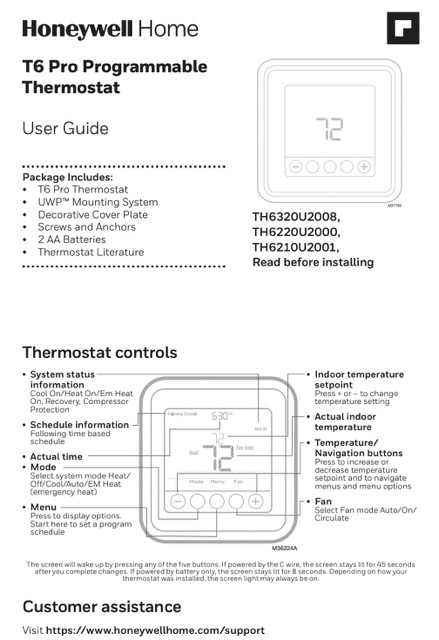
This page walks through the Honeywell TH6210U2001 T6 Pro Programmable Thermostat User Guide (document 00182EFS, Rev. 04-22). The T6 Pro is a five-button programmable thermostat for 20 to 30 VAC heating and cooling systems; the same guide also covers the TH6220U2000 and TH6320U2008. The points below follow the manual and cite its pages, and the PDF is linked here. Work from the guide whenever a screen or wire does not match what this summary shows.
Download TH6210U2001 T6 Pro User Manual (PDF)
Table of Contents
- What the T6 Pro Is
- Controls and Buttons
- Modes and Fan Settings
- Setting the Time and Date
- Programming the Schedule
- Overriding the Schedule
- Filter Reminders and Alerts
- Batteries
- Troubleshooting (From the Guide)
- Specifications and Support
- FAQ
What the T6 Pro Is
The T6 Pro (TH6210U2001) is a programmable thermostat with a backlit screen and five physical buttons. From the guide’s overview and controls panel:
- Programmable, four periods a day. Wake, Away, Home and Sleep, with different settings for weekdays and weekends.
- Five buttons. Menu, Select, and the + and − navigation buttons, plus Mode and Fan.
- Mode selection. Auto, Heat, Cool, EM Heat (emergency heat) and Off.
- Status display. Cool On, Heat On, Em Heat On, Recovery and Compressor Protection are shown as they apply.
The guide notes the thermostat works with 20 to 30 VAC systems, and the electrical ratings table lists terminals including W, W2 (Aux) and Y2 alongside C, so a single- or multi-stage layout may apply depending on your model in this family.
Controls and Buttons
- Menu. Opens the options list; this is also where you start a program schedule.
- Select. Confirms the highlighted entry as you move through menus.
- + and −. Raise or lower the temperature setpoint and move through menu items.
- Mode. Cycles the thermostat between Auto, Heat, Cool, EM Heat and Off.
- Fan. Switches the fan between Auto, On and Circulate.
Pressing any of the five buttons wakes the screen. When a C-wire supply is present, the backlight stays on and the screen does not sleep; on battery-only installations the display dims after a short period (the guide notes roughly eight seconds of lit display on battery).
Modes and Fan Settings
- Auto. The thermostat chooses heating or cooling to reach the setpoint.
- Heat. Heating only.
- Cool. Cooling only.
- EM Heat. Emergency heat on a heat-pump system that has auxiliary or backup heat.
- Off. Both systems off.
Fan choices: Auto runs the blower only during heating or cooling; On runs it continuously; Circulate runs it for a scheduled slice of each hour to keep air moving.
Setting the Time and Date
The guide has you press Menu, then arrow down to TIME, then press Select to enter the clock. You pick 12- or 24-hour display, then adjust the hour and minutes with the + and − buttons, confirming each entry with Select. From the same Menu you reach DATE to set the year, month and day. Do this before you rely on any schedule; the periods trigger on the clock, not the temperature.
Programming the Schedule
Press Menu, then arrow to PROG and press Select. Choose ON to enable the program. You then pick the day or group of days to edit, then a period (Wake, Away, Home or Sleep), then set the time and the temperature for that period. Repeat for each period, and switch to the other day group to set it separately. Wake is when you get up and get ready for the day; Away is when you leave; Home is when you return in the evening; Sleep is overnight. The guide’s pre-set times are Wake 6:00 AM, Away 8:00 AM, Home 6:00 PM and Sleep 10:00 PM, and it recommends starting from the pre-sets because they can reduce energy cost. If you do not want a schedule at all, set PROG to OFF.
Overriding the Schedule
For a one-off change, press + or − on the home screen; the change lasts until the next scheduled period. To hold a temperature indefinitely, use the hold option in the menu; the guide shows how to return to the program from the same screen. Because heating and cooling are programmed separately, change the Mode if you need to adjust the other season.
Filter Reminders and Alerts
An alert icon appears on the home screen when a reminder is due. Press Menu, arrow to ALRT, and press Select to see which alerts are active. Press Select again to snooze the reminder for 7 days, or arrow to CLER and press Select to clear it. The guide notes some alerts cannot be snoozed or cleared; if that happens, service may be needed and you should call your heating and cooling professional.
Batteries
Two AA alkaline batteries power the T6 Pro. If the thermostat is wired to a C (AC) supply, the batteries are optional and act as backup power; if it is not C-wired, the batteries are required. Install fresh batteries as soon as the low-battery icon appears on the home screen. The guide notes the icon shows up about two months before the batteries are depleted, and recommends replacing them at least once a year or before a trip longer than a month. If new batteries go in within about two minutes of removing the old ones, the time and day stay set; the schedule and other settings are held in memory.
Troubleshooting (From the Guide)
These are the guide’s own troubleshooting items (p.7-8). Only what the manual lists; if your issue is not here, use the Customer Assistance line at the end.
| Problem | What the guide says to do |
|---|---|
| Display is blank | Check and reset the circuit breaker; confirm the power switch at the heating/cooling system is on; make sure the furnace door is closed securely; install fresh AA alkaline batteries. |
| Heating or cooling does not respond | Press Mode to set Heat (or Cool), and make sure the setpoint is higher (or lower) than the indoor temperature. Then check the circuit breaker, the system power switch and the furnace door, and wait about 5 minutes for the system to respond. |
| Temperature settings do not change | Bring the setpoint inside the allowed ranges: Heat 40°F to 90°F (4.5°C to 32.0°C); Cool 50°F to 99°F (10.0°C to 37.0°C). |
| “Cool On” or “Heat On” is flashing | Compressor protection is engaged. Wait about 5 minutes so the compressor can restart without damage. |
| A reminder keeps appearing | Snooze from the ALRT menu for 7 days, or clear it with CLER; some alerts cannot be snoozed or cleared, and a service call may be needed. |
Specifications and Support
- Models covered by this guide: TH6210U2001, TH6220U2000 and TH6320U2008 (T6 Pro family).
- Voltage: 20 to 30 VAC (the guide’s electrical ratings).
- Program periods: four per day (Wake, Away, Home, Sleep), with weekday and weekend settings.
- Modes: Auto, Heat, Cool, EM Heat and Off.
- Fan modes: Auto, On and Circulate.
- Setpoint range: Heat 40°F to 90°F; Cool 50°F to 99°F.
- Power: two AA alkaline batteries; batteries optional when a C wire supplies AC power.
- Compressor protection: built-in, about 5 minutes; shown as “Cool On” or “Heat On” flashing.
- Warranty: 1-year limited (see the guide).
- Support: https://www.honeywellhome.com/support; Resideo Technologies, Inc., 1985 Douglas Drive North, Golden Valley, MN 55422.
For exact dimensions, mounting height, torque and the wiring terminal-by-terminal table, the guide’s Installation Instructions and the wiring diagrams on the later pages are the authority; this page is a companion to that document.
FAQ
How many periods per day does the T6 Pro program?
Four: Wake, Away, Home and Sleep. You can set them differently for weekdays and weekends.
Does the T6 Pro have an emergency heat setting?
Yes. On heat-pump systems with auxiliary or backup heat, the Mode cycle includes EM Heat, which the guide also shows in the status display as “Em Heat On”.
Do I need a C wire?
Not strictly. The T6 Pro runs on two AA alkaline batteries; if a C wire supplies AC power, the batteries are backup and the display stays lit. Without a C wire the batteries are required and the screen dims after a few seconds when idle.
Why does “Cool On” or “Heat On” keep flashing?
Compressor protection is engaged. The guide’s troubleshooting section says to wait about five minutes so the compressor can restart safely.
Why do my setpoints stop at 40 or 90 degrees?
You hit the programming range. The guide lists Heat 40°F to 90°F and Cool 50°F to 99°F; anything outside is rejected while you set the schedule.