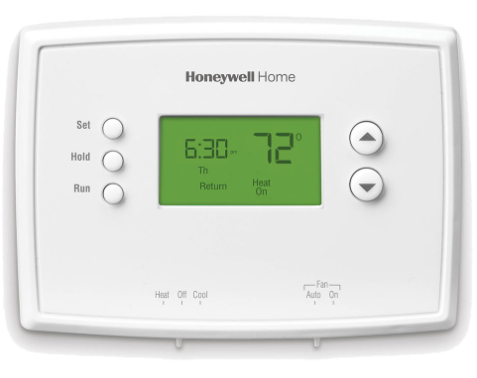
Take the batteries out of an RTH221B and the clock starts flashing. The schedule survives; the time and day do not. Two AAA cells, four program periods and a set of push buttons do the rest of the work. This page follows the operating booklet Honeywell printed for the RTH2300/RTH221 Series, in the order you meet each part: the switches on the front, the clock, the schedule, the overrides, and the six faults the booklet lists.
The file holds 48 pages. English runs from PDF page 1 to page 24, then the same booklet repeats in Spanish from page 25 to page 48. The document number is 69-2727ES-01, dated May 2012. Printed page numbers in the English half run two behind the PDF count, so printed page 19 is PDF page 21.
Download the official Honeywell RTH2300/RTH221 Series Operating Manual (PDF)
Table of Contents
- What the RTH221B Is
- Controls, Switches and Display
- Setting the Time and Day
- System and Fan Settings
- The Program Schedule
- Temporary and Permanent Overrides
- Compressor Protection, Filter Reminder and Batteries
- Troubleshooting: Six Printed Symptoms
- Specifications
- Frequently Asked Questions
What the RTH221B Is
The booklet is printed for two models, the RTH2300 and the RTH221. The RTH221B belongs to the RTH221 series, but the suffix never appears in the 48 pages: the cover, the model list on page 2 and every page header read RTH2300/RTH221. The booklet prints Honeywell, not Honeywell Home, and the copyright page carries a 2012 date.
The manual’s feature list runs to six items, and one of them is model-specific:
- Backlit display on the RTH2300, with no backlight claimed for the RTH221.
- Ambient (measured) temperature displayed at all times.
- One-touch access to the setpoint temperature.
- Preset program settings.
- Temporary and permanent override of the schedule.
- Built-in compressor protection.
The unit leaves the box pre-programmed. Page 3 says the only required step is setting the time and day, after which you check four settings and change them if needed: the system setting, preset to Off, the fan setting, preset to Auto, and the four program periods, preset to energy-saving levels for the hours you are at work or asleep.
Controls, Switches and Display
Three buttons sit below the screen: SET, HOLD and RUN. Two arrow buttons change the temperature, and the screen lights for 12 seconds when any button is pressed.
Two slide switches sit along the bottom edge of the case. The SYSTEM switch has three positions: Heat for heating control, Off with all systems off, and Cool for cooling control. The FAN switch has two: Auto, which the manual calls the most commonly used setting, runs the fan only while the heating or cooling system is on, and On runs it continuously.
The display carries more than the current temperature. The ambient reading is normally shown, and pressing an arrow once brings up the setpoint for five seconds with the setpoint indicator beside it. The current day and time sit on screen along with the active program period, Wake, Leave, Return or Sleep. Cool On means the cooling system is running and Heat On means the heating system is running. A flashing Cool On has a separate meaning, covered under compressor protection below. Lo Batt is the battery warning.
Setting the Time and Day
The clock takes three steps:
- Press SET, then use the up or down arrow to set the clock time.
- Press SET again, then use the arrows to select the day of the week.
- Press RUN to save and exit.
If the clock is flashing, the thermostat follows the Monday Wake period until the time and day are reset. That behaviour matters after a battery change, when the schedule is intact but the clock is not.
System and Fan Settings
The SYSTEM switch decides which equipment the thermostat is allowed to run. Heat gives heating control, Cool gives cooling control, and Off turns heating and cooling off.
One caution is printed twice in the booklet, on PDF page 2 and again on page 7: to prevent possible compressor damage, do not operate the cooling system when the outdoor temperature is below 50°F (10°C).
The FAN switch is independent of the schedule. Auto lets the fan follow the heating or cooling call, and On leaves it running continuously regardless of whether the system is heating or cooling.
The Program Schedule
Both models program four periods a day: Wake, Leave, Return and Sleep. The difference is how the week is divided. The RTH2300 programs weekdays (Mo-Fr) as one block and the weekend (Sa & Su) as a separate block. The RTH221 programs one set of four periods for Monday through Sunday, so every day follows the same times and temperatures.
The programming sequence is the same on both models. Press SET until Set Schedule appears. Set the Wake time, press SET, set the temperature for that period, press SET, then repeat for Leave, Return and Sleep. On the RTH2300, SET then moves to the weekend periods. RUN saves and exits. The booklet adds one reminder: make sure the thermostat is set to the system you want to program, Heat or Cool, before you start.
Page 10 prints the preset values. The table is laid out with separate weekday and weekend columns, matching the RTH2300’s two blocks.
| Period | Heat (Mon-Fri) | Cool (Mon-Fri) | Heat (Sat-Sun) | Cool (Sat-Sun) |
|---|---|---|---|---|
| Wake (6:00 am) | 70° | 78° | 70° | 78° |
| Leave (8:00 am) | 62° | 85° | 62° | 85° |
| Return (6:00 pm) | 70° | 78° | 70° | 78° |
| Sleep (10:00 pm) | 62° | 82° | 62° | 82° |
The illustration on page 9 uses the same four periods with times of 6:00 am, 8:00 am, 6:00 pm and 10:00 pm, and shows 70° for Wake and Return and 62° for Leave and Sleep. The booklet recommends these settings as an energy-saving starting point.
Temporary and Permanent Overrides
An arrow press does not edit the schedule. It creates a temporary override: the new temperature holds only until the next programmed period begins, and the word Temporary appears on the display. Pressing RUN cancels the override and returns the unit to the schedule immediately.
HOLD works differently. It overrides the temperature settings for all periods, turns the program schedule off, and keeps whatever temperature you set, 24 hours a day, until you change it by hand or press RUN to cancel Hold and resume the schedule. The manual’s wording is that the feature allows you to adjust the thermostat manually, as needed.
The manual repeats one condition for both overrides: make sure the thermostat is set to the system you want to control, Heat or Cool.
Compressor Protection, Filter Reminder and Batteries
Compressor protection is built in. If the compressor tries to restart too soon after shutdown, the thermostat holds it off for 5 minutes. During the wait, Cool On flashes, or Heat On on a heat pump system, and the message stops flashing when the safe wait has elapsed and the compressor starts.
The filter reminder belongs to the RTH2300 only. When the reminder is turned on during installation, Change Filter flashes on screen once the filter needs replacing, and holding RUN for 3 seconds resets the alert after the new filter is in.
Power comes from two AAA alkaline batteries. Lo Batt appears 60 days before the cells are depleted. The booklet recommends replacing them once a year, or before leaving home for more than a month. Most settings sit in non-volatile memory, so only the clock and the day need setting after a change. One warning comes before the batteries come out: set the SYSTEM switch to Off first, otherwise the heating or cooling system could remain activated even with the batteries removed.
Troubleshooting: Six Printed Symptoms
The booklet prints six symptoms across pages 19 and 20, two on page 19 and four on page 20. The wording below follows the page order and keeps the manual’s own phrasing.
| Symptom | What the manual says |
|---|---|
| Display is blank | Make sure furnace door is closed securely. Make sure fresh AAA alkaline batteries are correctly installed (see page 16). |
| Heating or cooling system does not respond | Set system switch to Heat (see page 7). Make sure the temperature is set higher than the Inside temperature. Set system switch to Cool (see page 7). Make sure the temperature is set lower than the Inside temperature. Wait 5 minutes for the system to respond. |
| Temperature settings do not change | Make sure heating and cooling temperatures are set to acceptable ranges: Heat 40° to 90°F (4.5° to 32°C); Cool 50° to 99°F (10° to 37°C). |
| “Cool On” or “Heat On” is flashing | Compressor protection feature is engaged. Wait 5 minutes for the system to restart safely, without damage to the compressor (see page 15). |
| “Heat On” is not displayed | Set the System switch to Heat, and set the temperature level above the current room temperature (see page 7). |
| “Cool On” is not displayed | Set the System switch to Cool, and set the temperature level below the current room temperature (see page 7). |
Nothing else is listed: the booklet contains no error-code table, reset procedure or diagnostic menu.
Specifications
| Item | Detail |
|---|---|
| Models covered | RTH2300 and RTH221 (the RTH221B belongs to the RTH221 series) |
| Document | 69-2727ES-01, 48 pages, English 1-24 and Spanish 25-48 |
| Power | Two AAA alkaline batteries |
| Program periods | Four per day: Wake, Leave, Return, Sleep |
| Week structure | RTH2300 programs Mo-Fr and Sa-Su separately; RTH221 programs Mo-Su as one set |
| Preset heat | 70° / 62° / 70° / 62° |
| Preset cool | 78° / 85° / 78° / 82° |
| Heat range | 40° to 90°F (4.5° to 32°C) |
| Cool range | 50° to 99°F (10° to 37°C) |
| Compressor protection | 5 minutes |
| Backlight | RTH2300 only |
| Filter reminder | RTH2300 only |
| Warranty | 1 year limited, excluding battery |
Frequently Asked Questions
What is the difference between the RTH221 and the RTH2300?
Three differences appear in the booklet. The RTH2300 has a backlit display and the RTH221 does not. The RTH2300 carries the Change Filter reminder and the RTH221 does not. And the RTH2300 programs weekdays and weekends as two separate blocks, while the RTH221 programs one Monday-to-Sunday set of four periods.
Does the RTH221B need a C wire?
This booklet is an operating manual and contains no wiring section, no terminal table and no mention of a C wire. Power comes from two AAA alkaline batteries. The booklet also carries a caution not to run cooling when the outdoor temperature is below 50°F (10°C). Wiring questions are outside what these 48 pages cover.
Why is the display blank?
The manual gives two checks: make sure the furnace door is closed securely, and make sure fresh AAA alkaline batteries are correctly installed. The battery page adds a warning that the SYSTEM switch should be set to Off before the batteries are removed, since the heating or cooling system could otherwise stay activated.
Why will the temperature not go above or below a certain point?
The thermostat accepts a limited range. Heating can be set from 40° to 90°F (4.5° to 32°C) and cooling from 50° to 99°F (10° to 37°C). Page 20 tells you to make sure the heating and cooling temperatures are set within those ranges.
What does a flashing Cool On mean?
Compressor protection is engaged. The thermostat forces the compressor to wait 5 minutes before restarting, and the message stops flashing when the safe wait time has elapsed. Heat On flashes the same way on a heat pump system.
Will changing the batteries erase the schedule?
No. Most settings are stored in non-volatile memory, and only the clock and the day have to be set again. Until they are, a flashing clock means the thermostat follows the Monday Wake period.
Can the RTH221 hold a different schedule for the weekend?
No. Its programming step sets the Wake time for Mo-Su, one period list for the whole week. Separate Sa & Su periods appear only in the RTH2300 instructions, where SET moves from the weekday block to the weekend block.