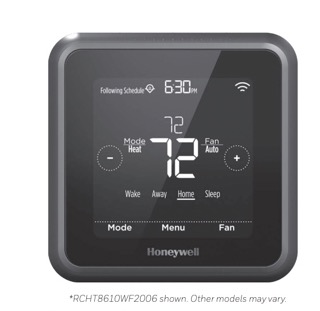
This page is the Honeywell Lyric T5 Programmable Thermostat User Manual explained. The source is Honeywell’s official Lyric T5 Wi-Fi Programmable Thermostat User Guide, document number 33-3991, the booklet shown for model RCHT8610WF2006 (other Lyric T5 Wi-Fi models share it). The guide runs about 33 pages and covers the touchscreen, the Lyric app, scheduling, Wi-Fi, alerts, and troubleshooting.
Download Honeywell Lyric T5 Programmable Thermostat User Manual (PDF)
Contents
- What the Lyric T5 Can Do
- Touchscreen, System Modes, and Fan Modes
- Connecting to Wi-Fi and the Lyric App
- Scheduling and Overrides
- Main Menu Settings and Reset Options
- Alerts and Maintenance Reminders
- Compatibility Before You Install
- Troubleshooting
- Getting Help and Warranty
What the Lyric T5 Can Do
Page 3 lists the headline features. The Lyric T5 Wi-Fi is a connected touchscreen thermostat built around four ideas:
- Flexible scheduling. Choose location-based control (geofencing), smart scheduling, a time-based schedule, or no schedule at all.
- Smart Alerts. The thermostat sends notifications for things like extreme indoor temperatures and reminders for maintenance such as filter changes.
- Automatic heat-to-cool changeover. In Auto mode it decides whether to heat or cool to reach the setpoint.
- Smart Response. The unit learns your heating and cooling cycle times so it reaches the temperature you want at the time you want it.
The Lyric app can manage several thermostats and several people in one household, which matters for the geofencing behavior described later.
Touchscreen, System Modes, and Fan Modes
Three touch keys sit across the top of the display (pages 4 and 8): Mode selects the system mode, Fan selects fan operation, and Menu opens programming and settings. The center shows the current indoor temperature, and the small number is the desired temperature you change with + and -. The screen enters idle mode about 45 seconds after the last touch and may dim depending on the brightness setting.
System modes (page 8): Heat, Cool, Off, Auto (when enabled), and Em Heat (Emergency Heat). The guide is explicit that Em Heat only appears on heat pump systems with an auxiliary/emergency heat stage configured, that Auto mode is disabled by default, and that either mode may not show up depending on the equipment and how the thermostat was installed.
Fan modes (page 9): On runs the blower continuously, Auto runs it only during heating or cooling, and Circ (circulate) runs it at random intervals at least 35% of the time to keep air moving.
Built-in compressor protection (page 9): after a shutdown the compressor waits a few minutes before restarting to prevent damage. During that wait the screen flashes Cool On, or Heat On on a heat pump. The same flashing message also acts as a startup delay after an AC power loss.
Connecting to Wi-Fi and the Lyric App
To control the thermostat remotely it must join your home network through the Lyric app (page 10). The guide’s steps:
- Put your phone or tablet on a 2.4 GHz Wi-Fi signal. Many routers broadcast both 2.4 and 5.0 GHz; pick the 2.4 GHz one.
- At the thermostat, press and hold the indoor temperature in the center of the screen for 5 seconds until the screen changes.
- Install the Lyric app from the App Store or Google Play, open it, and tap SET UP NOW when the thermostat appears under “Thermostat Found.” If it does not appear, tap INSTALL A DEVICE.
A status icon in the upper-right corner shows whether Wi-Fi is connected, disconnected or not set up, or off. To move the thermostat to a new network (page 11), delete it first in the app under Thermostat Configuration, then hold the center temperature for 5 seconds and set it up again; your equipment settings and preferences are retained.
Scheduling and Overrides
Page 13 lays out the four scheduling styles. Location-based control uses your phone’s GPS: the thermostat drops to your Away temperature when you cross the geofence boundary on the way out and returns to your Home temperature when you cross back on the way in. Smart scheduling adds a Sleep period to that behavior. Time-based scheduling uses four periods per day, Wake, Away, Home, and Sleep, and can be the same every day, split weekday/weekend, or set a day at a time. If you do not want a program, select no schedule and adjust manually.
Overrides (pages 6 to 7) are how you depart from the program for a while. A Hold Until temporary hold changes the setpoint for up to 12 hours, or until a time you choose, then the schedule resumes; it is meant for time-based schedules. A Permanent Hold keeps a temperature until you change it or run the schedule again. A Vacation Hold suspends the program for a longer span and, the guide notes, can only be started from the Lyric app. In every case, touching Run Schedule ends the hold and returns to the program.
Main Menu Settings and Reset Options
Page 12 maps the whole menu. From the home screen, touch Menu and arrow through these items:
- Schedule (create or edit a program), Clean Screen (disables the touch layer for 30 seconds so you can wipe it), Temp Scale (Fahrenheit or Celsius), and Screen Lock (limits access to settings).
- Wi-Fi (configure or change the network), Brightness, and Recovery (turn the Smart Response learning feature on or off).
- Clock and Date (only manual when the thermostat is offline; a connected unit sets them itself), EQMT Status (live heating, cooling, and fan status), and Device Info (MAC ID, IP address, date code, model number, and firmware versions).
- Alerts (only present when an active alert shows) and Reset.
Under Reset (page 24) the guide offers four choices: a return to the original settings (the menu item is labeled “Factory reset”), a Schedule reset back to the default Mon-Fri and Sat-Sun program, a HomeKit reset that clears Apple HomeKit credentials, and a Wi-Fi reset that clears the saved router credentials.
Alerts and Maintenance Reminders
Pages 26 and 27 print the alert list. When the alert symbol appears on the home screen, touch Menu then ALERTS; a three-digit code appears by the clock and a description scrolls. Non-critical alerts can be snoozed for up to seven days or dismissed; some critical alerts cannot. Representative codes:
| Code | Alert or reminder |
|---|---|
| 164 | Heat pump needs service; contact a heating/cooling professional |
| 168 / 170 / 173 | Wi-Fi radio error, internal memory error, or thermostat temperature sensor error; contact Lyric Technical Support |
| 171 | Set the date and time so scheduling works |
| 175 | AC power resumed after a loss; no action needed |
| 181 / 182 | Replace the air filter, then touch Dismiss to reset the timer |
| 184 / 185 / 187 / 188 / 189 | Humidifier pad, dehumidifier filter, ventilator filter, or UV bulb replacement reminders |
| 210 / 388 | Register online for outdoor temperature and remote access |
| 399 / 400 / 508 | No internet, no Wi-Fi signal, or Wi-Fi not configured |
Compatibility Before You Install
Page 28 (“General system information”) carries the constraints that decide whether the Lyric T5 fits your system, plus three cautions. Quote them rather than guessing:
- Compatible with most single-stage and multi-stage conventional and heat pump heating and cooling systems.
- 24 VAC power through a “C” (common) wire is required.
- Does not work with electric baseboard heat (120-240V) or with millivolt systems.
- Remote control through iOS or Android; compatible with Apple HomeKit and Amazon Echo.
- Heat setpoint range 40 to 90 °F (4.5 to 32.0 °C); cool setpoint range 50 to 99 °F (10.0 to 37.0 °C); sensor accuracy ±1.5 °F at 70 °F.
CAUTION: ELECTRICAL HAZARD. Can cause electrical shock or equipment damage. Disconnect power before beginning installation.
CAUTION: EQUIPMENT DAMAGE HAZARD. Compressor protection is bypassed during testing. To prevent equipment damage, avoid cycling the compressor quickly.
CAUTION: MERCURY NOTICE. If the Lyric T5 Wi-Fi thermostat is replacing a thermostat that contains mercury in a sealed tube, do not place the old thermostat in the trash. Contact your local waste management authority for proper recycling or disposal instructions.
Troubleshooting
Page 29 is the guide’s own troubleshooting list, reproduced here with only what the manual states.
| Symptom | What the manual advises |
|---|---|
| Thermostat screen is blank | Check the circuit breaker or fuse for the heating/cooling system and turn it on if off. Make sure the power switch at the system is on. Make sure the furnace door is closed securely. |
| Screen is difficult to read | Increase the screen brightness (Menu, then Brightness; see page 21). |
| Heating or cooling system is not responding | Set Mode to Heat and make sure the setpoint is higher than the indoor temperature, or set Mode to Cool and make sure the setpoint is lower. Check the breaker/fuse, the system power switch, and the furnace door. Then wait 5 minutes for the system to respond. |
| Temperature setting does not change | Make sure the setpoints are within range: heat 40 to 90 °F, cool 50 to 99 °F. |
| Cool On or Heat On is flashing | Compressor protection is engaged. Wait a few minutes for a safe restart, then it clears on its own (see page 9). |
Getting Help and Warranty
The guide’s welcome page lists support channels: lyric.honeywell.com, email MyLyric@honeywell.com, and Lyric Technical Support at 1-800-633-3991. Page 33 states a two-year limited warranty on workmanship and materials, with service handled through Honeywell Customer Care at 1-800-468-1502. Before you call, open Menu, then Device Info, and note the model number, MAC ID, and firmware versions, since those are what support will ask for.
If you are uninstalling or handing the home over, use the reset options on page 24 first. The guide is clear that the thermostat keeps your settings and router information in memory even when it is powered off, so clearing the schedule, Wi-Fi, and HomeKit credentials protects your account.