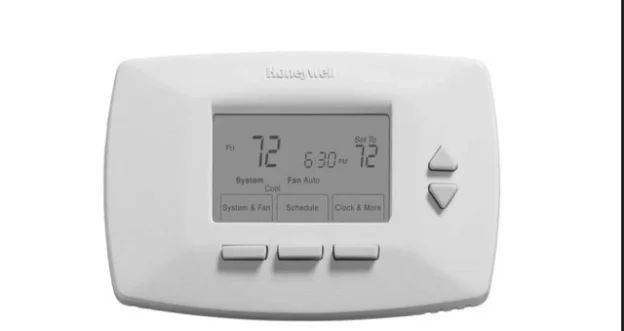
The Honeywell RTH7400D Programmable Thermostat Owner’s Guide is a 64-page booklet, document 69-1726-1, dated 08-04 on the back cover. It covers the whole life of the unit in one file. Installation runs from page 3 to page 26, the installer setup menu from page 27 to page 38, and operation from page 39 to page 61. This page follows that booklet and quotes its wording where the wording decides how a step works.
Download the Honeywell RTH7400D Owner’s Guide (PDF)
Download Honeywell RTH7400D Programmable Thermostat Owner’s Guide (PDF)
Table of Contents
- What the Guide Covers
- What Comes in the Box
- Before You Touch the Wires
- Mounting the Wallplate
- Wiring: Conventional and Heat Pump
- Batteries and Mounting the Thermostat
- Setting the Calendar and Clock
- System and Fan Settings
- Installer Setup Numbers
- Programming the Four Periods
- Temporary and Permanent Holds
- Filter Timer
- Adaptive Intelligent Recovery
- Compressor Protection
- Troubleshooting Tips
- Specifications
- Frequently Asked Questions
What the Guide Covers
The contents page lists twelve headings with their page numbers. The file runs straight through in English with no second language, so the printed numbers and the PDF page numbers are the same throughout.
| Section | Pages |
|---|---|
| Prepare for Installation | 3 |
| Follow Important Instructions | 5 |
| Remove Old Thermostat | 6 |
| Follow Special Instructions | 7 |
| Label Old Thermostat Wires | 10 |
| Mount New Wallplate to Wall | 11 |
| Connect Wires to New Wallplate | 15 |
| Install Batteries | 23 |
| Attach New Thermostat to Wallplate | 24 |
| Configure Installer Setup | 26 |
| Customer Assistance | 62 |
| Limited One-Year Warranty | 63 |
Page 1 states the electrical scope in one sentence: the thermostat provides electronic control of “24 Vac heating and cooling systems or 750 mV heating systems.” No other voltage is mentioned anywhere in the booklet.
One numbering detail explains an apparent gap. The contents page puts Configure Installer Setup at 26, while the numbered step itself opens on page 27, because page 26 finishes the calendar step.
What Comes in the Box
Step 1 asks you to check six items before starting. The guide names them in the parts drawing on page 3:
- Wallplate
- Thermostat
- Mounting screws (2) and wall anchors (2)
- Owner’s guide
- Wire labels
- Caution card
If any of them is missing, the instruction is to call Honeywell Customer Care at 1-800-468-1502 before returning the thermostat to the store. The same page warns to turn off power at the furnace or at the fuse and circuit breaker panel before you begin.
The tool list on page 4 is short and specific:
- Two AA alkaline batteries
- No. 2 Phillips screwdriver and standard pocket screwdriver
- Drill
- Drill bit, 3/16 in. for drywall and 7/32 in. for plaster
- Level (optional)
- Hammer
- Pencil
- Electrical tape
The bit sizes are worth reading twice: 3/16 in. for drywall and 7/32 in. for plaster, with the plaster figure repeated again in the mounting step on page 14.
Before You Touch the Wires
Step 2 is a single rule: do not connect the wires to the new thermostat based on wire colour, because damage can occur to the heating or cooling system. The guide gives the alternative in the same paragraph: the enclosed wire labels mark the wires connected to the old thermostat, and those labels are what the new connections follow.
Step 3 removes the old unit. Power goes off first, at the system or at the fuse and circuit breaker panel. Then the cover comes off, and the old thermostat comes off the wall or wallplate with the wires left in place. Page 6 adds a mercury notice: a thermostat with mercury in a sealed tube does not go in the trash, and your local waste management authority has the recycling and disposal instructions.
The C and C1 wire rules
Step 4 handles the wires that are easy to get wrong. Page 7 gives the two-wire case and page 8 gives the one-wire case:
- Two C and C1 wires on the old thermostat: do not connect them to the new thermostat. Disconnect them, keep them from touching each other or any other wire, and wrap the bare end of each one separately with electrical tape.
- One C or C1 wire: connect that wire to C on the new thermostat.
- Wires not connected to the old thermostat: do not connect them to the new thermostat, and wrap their ends with electrical tape.
Step 5 labels each wire as it is disconnected, using the tags supplied in the box. The page adds a practical warning: do not let the wires fall into the wall opening once they are free.
Mounting the Wallplate
Step 6 is seven numbered moves across pages 11 to 14. Separate the wallplate from the thermostat, pass the labeled wires through the wire hole on the wallplate, then position it with the arrow pointing up.
The level is used for appearance only, and the guide says so in brackets. Mark the two mounting holes with a pencil, move the wallplate aside, and drill at the marks: 3/16 in. for drywall, 7/32 in. for plaster. Tap the wall anchors in until they sit even with the wall surface, set the wallplate over them, insert the two screws, check the level if you want, and tighten.
Wiring: Conventional and Heat Pump
Step 7 starts with a choice rather than a connection. Standard heating and cooling systems use the conventional letter designations. Heat pump systems use the heat pump designations. The guide points to the system-type table on page 30 when you are not sure which one you have.
The jumper between Rc and R
Two rules cover the metal jumper wire on the terminal block:
- If wires are to be connected to both Rc and R, loosen both screw terminals and remove the jumper.
- If only one of the two is to be connected, leave the jumper in place.
Wires go into the holes on the side of the terminal block that match the letter designations, and the screws are tightened afterwards. One limit applies to the whole block: do not connect more than one wire to each terminal.
Conventional systems
Page 18 prints the letter comparison for a conventional system. Each row shows a terminal on the new thermostat and the letters that may appear on the labeled wires from the old one.
| Terminal on the new thermostat | Possible letter on the labeled wire |
|---|---|
| RC | RC or R |
| R | R or RH, 4, V |
| W | W or W1, H |
| Y | Y or Y1, M |
| G | G or F |
| C | C or C1, X, B |
| Y2 | Y2 |
| W2 | W2 |
Four numbered notes follow that chart. They are printed on page 19, and the numbers match the triangles in the drawing:
- If wires go to both RC and R, remove the jumper between them. If only one of the two is used, leave the jumper in place.
- If the old thermostat had wires on both R and RH, remove the jumper on the new one. Connect the old R to the new RC and the old RH to the new R.
- If two C and C1 wires were connected to the old thermostat, tape each bare end separately and do not use them.
- If one C or C1 wire was connected, it goes to the C designation on the new thermostat.
Heat pump systems
Page 20 prints the equivalent chart for a heat pump. This one has nine positions, one more than the conventional block.
| Terminal on the new thermostat | Possible letter on the labeled wire |
|---|---|
| RC | VR or V or R |
| R | No wire shown; the jumper stays in place |
| O/B | H or B, O |
| Y | Y1 or M or Y |
| G | F or G |
| C | X or B, C |
| L | F or L |
| E | X2 or X, E |
| AUX | AUX, W1, W or W2 |
On the heat pump chart the R position carries no wire of its own. The drawing leaves the jumper between RC and R in place, and the first note on page 21 states that instruction directly. The other three notes cover cases that need a decision before wiring continues:
- If the old thermostat had separate wires on both V and VR, some system modification is required. Call your local heating and cooling contractor for assistance.
- If the old thermostat had wires on both O and B, attach the B wire to the C designation on the new thermostat. If another wire is already matched to C, contact Honeywell.
- If the old thermostat had wires on W1, Y1 and W2, some system modification is required. Call your local heating and cooling contractor for assistance.
Step 7 closes by pushing excess wire back into the wall opening and keeping the wires inside the shaded area marked on the drawing.
Batteries and Mounting the Thermostat
Two fresh AA alkaline batteries go on the back of the thermostat, in the holder marked on the casing. The guide then asks for one more move that is easy to miss: remove the tab labeled “Remove during installation” in the lower right corner of the thermostat back.
Mounting is two steps and a power check. Align the screw blocks with the pins on the back of the thermostat, then push the thermostat straight onto the wallplate until it snaps into place. Turn the power back on at the system or at the fuse and circuit breaker panel. If the wires interfere with mounting, push the excess back into the wall opening.
Setting the Calendar and Clock
Page 25 states the memory behaviour: once the calendar is set, the thermostat keeps the current time and day in memory for up to ten years under normal use. The calendar is the first screen shown when the unit is powered for the first time.
- Use the Up or Down arrow to set the Month.
- Press Next to advance to the Date.
- Use the Up or Down arrow to set the Date.
- Press Next to advance to the Year.
- Use the Up or Down arrow to set the Year.
- Press Done to advance to the Time.
- Use the Up or Down arrow to set the Time.
- Press Done again to reach the home screen.
The clock has its own path once the unit is running. Press Clock & More, set the time with the arrows, and press Done. A footnote on page 48 adds that the day of the week should already be correct, and points back to the installer setup section if it is not.
System and Fan Settings
The three buttons under the display carry the everyday settings. System & Fan selects Heat, Off, Cool and Em Heat, and also selects Fan Auto or On. Schedule selects the programming mode. Clock & More selects time and furnace filter information. The two arrow buttons raise or lower the temperature setting, and in other screens they make selections.
Heat, Off, Cool and Em Heat
- Heat: the thermostat controls the heating system.
- Off: heating and cooling systems are both off.
- Cool: the thermostat controls the cooling system.
- Em. Heat: available on heat pump systems with auxiliary heat. The thermostat controls emergency heat and auxiliary heat if needed, and the heat pump compressor is not operational.
Page 41 prints a caution in the system settings section. It carries an equipment damage hazard and warns that air conditioning compressor damage is possible. It also states that the cooling system should not be operated when the outdoor temperature is below 50°F (10°C).
Fan Auto and On
Press System & Fan, then press the Fan button to choose between two modes. Auto is the setting the guide calls normal for most homes, and the fan runs only when the heating or cooling system is on. On keeps the fan running continuously, for improved air circulation or for more efficient air cleaning.
Installer Setup Numbers
Step 11 is the menu that tells the thermostat what equipment it is connected to. The entry gesture uses two different presses, and the order matters:
- Press and release the System button.
- Press and hold the center button for approximately five seconds, until the screen changes.
- Release the center button when the display matches the drawing on page 28.
Inside the menu, the arrows change the setting, Next advances to the next installer setup number, Done exits and saves, and Go Back returns to the last one. The number sits on the left of the display and the selected value on the right.
Thirteen setup numbers are documented. Three of them, 0180, 0190 and 0240, may not appear at all. The guide says to move to the next page when the number is missing from the left side of the display.
| Number | Name | Settings |
|---|---|---|
| 0120 | Date (Year Upper) | First two digits of the calendar year, 20 for 2005 |
| 0130 | Date (Year Lower) | Last two digits of the calendar year, 05 for 2005 |
| 0140 | Date (Month) | Number of the current month |
| 0150 | Date (Day) | Number of the current date |
| 0170 | System Type Selection | 1 to 10, listed below |
| 0180 | Fan Control in Heating | 0 gas or oil heat, 1 electric heat |
| 0190 | Heat Pump Changeover Valve | 0 changeover in cooling with an O wire, 1 changeover in heating with a B wire |
| 0240 | Heating Cycle Rate | 5, 9, 3 or 1 by equipment type |
| 0320 | Temperature Indication Scale | 0 Fahrenheit, 1 Celsius |
| 0330 | Daylight Savings | 0 off, 1 on |
| 0500 | Furnace Filter Change Reminder | 0 off, 1 to 6 by interval |
| 0530 | Adaptive Intelligent Recovery | 0 conventional recovery, 1 adaptive |
| 0640 | Clock Format | 12 or 24 |
0170, the system type list
Page 30 lists ten options:
- Heating and Cooling (Conventional), gas, oil or electric heating with central air conditioning.
- Single-stage Heat Pump with no back-up or auxiliary heat, where the compressor runs in both heating and cooling.
- Heat Only with no fan (Conventional), with no wire on the G terminal.
- Heat Only with fan (Conventional), typically wires R, W and G.
- Hot Water Heat Only (Conventional), for three wires or for normally closed hot water valves wired to R and Y.
- Cool Only (Conventional), central air conditioning only.
- Multistage Heat Pumps, a heat pump with auxiliary or back-up heat.
- Multistage Conventional Heating and Cooling with 2 stages of heat on W and W2 and 2 stages of cool on Y and Y2.
- Multistage Conventional Heating and Cooling with 2 stages of heat on W and W2 and 1 stage of cool on Y.
- Multistage Conventional Heating and Cooling with 1 stage of heat on W and 2 stages of cool on Y and Y2.
0180, 0190 and 0240
Fan control in heating depends on who runs the fan during a heat call. At 0180, 0 means the heating system controls the fan, which is the gas or oil case, and 1 means the thermostat controls it, which is the electric heat case.
Changeover at 0190 follows the wire that was connected to O/B. Use 0 when an O wire went to that terminal, and 1 when a B wire did.
Heating cycle rate at 0240 takes four values, and each one names equipment rather than a number of cycles. Value 5 is a gas or oil furnace under 90% efficient and value 9 is an electric furnace. Value 3 covers gas or oil hot water heat and a gas furnace at 90% or above. Value 1 is gas or oil steam or gravity heat.
Programming the Four Periods
The thermostat runs up to four periods. The guide describes each one by what the household is doing. Wake is the period when you awaken and want the home at a comfortable temperature. Leave is the period away from home, and Return is the period when you come back. Sleep is the period when you are asleep and want an energy-saving temperature. Monday through Friday can share one set of times and temperatures, and Saturday and Sunday are scheduled separately.
- Press the Schedule button. The View button looks at the schedule without editing it.
- Press the Edit button.
- Monday through Friday flashes. Press Select Day to select that block. Checkmarks appear next to the days selected.
- Press Next Step. Wake flashes to show it is selected.
- Press Next Step to reach the Wake time, then change it with the arrows.
- Press Next Step to reach the heating temperature, then change it with the arrows.
- Press Next Step to reach the cooling temperature, then change it with the arrows.
- Repeat for Leave, Return and Sleep, then press Done. “Saved” appears on the display while the changes go to the selected days.
- For Saturday and Sunday, repeat the whole sequence. Use the Down arrow until Sat or Sun flashes, then press Select Day.
The day list is worked with the arrows rather than the Select Day button alone. Up and Down move through the days, and Select Day or DeSelect Day adds or removes the day you are on.
Temporary and Permanent Holds
A temporary hold ends by itself. Press the Up or Down arrow next to the temperature you want to adjust, and “Temporary” appears above the set temperature. The setting holds until the next scheduled period time, and Use Schedule cancels it and resumes the schedule.
A permanent hold does not end by itself. Set the temperature with the arrows, press Hold, and “Permanent Hold” shows on the display. It stays until it is cancelled, and Use Schedule is the button that cancels it and resumes the schedule.
Filter Timer
The filter timer counts fan run time rather than calendar days. The interval is set at installer setup number 0500. “Change Filter” appears on the display when the timer expires, and pressing Reset restarts it.
The remaining time can be checked without waiting for the reminder. Press Clock & More, press Next, press Reset if you want to restart the timer at that moment, and press Done. The reminder itself is switched on or off at installer setup number 0500.
Adaptive Intelligent Recovery
The feature removes the guesswork of when to start heating or cooling. The guide’s example is a Wake period set for 6:00 AM at 70°F. The thermostat turns the heat on before 6:00 AM so that the house reaches 70°F by 6:00 AM.
Two details make it recognisable in use. The word “Recovery” appears on the screen when the system is coming on before a scheduled time. The learning period is stated as well: about a week to adjust to local weather, your schedule, the construction of your home and your heating or cooling system. Each day adjusts the next day’s recovery start time.
The feature is switched at installer setup number 0530. Value 0 is conventional recovery, where the system starts at the programmed time, and 1 is adaptive, where it starts early enough to reach the setting by the start of the period.
Compressor Protection
The thermostat has a built-in minimum-off timer that prevents the compressor from restarting too early after a shutdown. The timer is activated after the compressor turns off.
If there is a call during that window, the display shows “Wait”. When the timer expires, “Cool On” or “Heat On” appears solidly and the compressor and fan turn on. A footnote on page 58 marks “Heat On” as heat pump only.
Troubleshooting Tips
The troubleshooting section runs across pages 59, 60 and 61 as a two-column table with fourteen entries: four on page 59, six on page 60 and four on page 61. Both columns below are the guide’s own text, and the symptom wording is kept exactly as printed so you can match it to the display in front of you.
| If . . . | Then . . . |
|---|---|
| Display is blank. | Check that fresh AA alkaline batteries are installed as marked on the thermostat. |
| Temperature settings do not change. | Check that the temperature settings are: Heating 40°F to 90°F (4.5°C to 32°C). Cooling 50°F to 99°F (10°C to 37°C). |
| Heating system does not turn on. | Set the system to Heat by pressing the System button. Check the heat temperature setting to be sure it is set above the room temperature and “Heat On” shows solidly in the display. Check the circuit breaker to be sure it is not tripped. Check power switch at heating and/or cooling system to be sure it is on. Check the furnace door to be sure it is closed securely. Wait five minutes for the heating system to respond. If all of this was checked, contact your local heating and cooling contractor. |
| Cooling system does not turn on. | Set the system to Cool by pressing the System button. Check the cool temperature setting to be sure it is set below the room temperature and “Cool On” shows solidly in the display. Check the circuit breaker to be sure it is not tripped. Check the power switch at the heating and/or cooling system to be sure it is on. Check the furnace door to be sure it is closed securely. Wait five minutes for the cooling system to respond. If all of this was checked, contact your local heating and cooling contractor. |
| Cannot set System setting to Cool. | Check Installer Setup Number 0170, Heating and/or Cooling System Type; make sure the setting matches the installed heating and/or cooling system. |
| “Heat On” is not shown in the display. | Set the System setting to Heat and set the temperature setting above the room temperature. If “Heat On” is shown solidly in the display, but the heating system does not turn on, see “Heating system does not turn on” in the Troubleshooting Tips. |
| “Cool On” is not shown in the display. | Set the System setting to Cool and set the temperature setting below the room temperature. If “Cool On” is shown solidly in the display, but the cooling system does not turn on, see “Cooling system does not turn on” in the Troubleshooting Tips. |
| “Wait” shows in the display. | Compressor minimum-off timer is active. Wait up to five minutes for the cooling or heating system to turn on. |
| Fan does not turn on in a call for heat (electric furnaces only). | Check Installer Setup Number 0180, Fan Control in Heating, and make sure it is set to Electric Heat. |
| Heat pump puts out cool air in the heat mode and warm air in the cool mode (heat pumps only). | Check Installer Setup Number 0190, Heat Pump Changeover Valve, and make sure the setting matches the changeover required by the installed heat pump. |
| Both the heating and cooling systems are running at the same time. | Check Installer Setup Number 0170, Heating and/or Cooling System Type, and make sure the setting matches the installed heating and/or cooling system. Check and make sure the bare portions of the wires are not touching. |
| Heating system is running in cool mode. | Check Installer Setup Number 0170, Heating and/or Cooling System Type, and make sure the setting matches the installed heating and/or cooling system. |
| Heating system does not turn off and the heat temperature setting is set below the room temperature (“Heat On” is not shown in display). | Check Installer Setup Number 0170, Heating and/or Cooling System Type, and make sure the setting matches the installed heating and/or cooling system. |
| Red LED is on in the upper left corner and the Heat Pump is not working. | A system monitor is wired to the thermostat L terminal. See Heating or Cooling system does not turn on in the Troubleshooting Tips. |
Six of the fourteen entries end at a setup number rather than at a part, and 0170 accounts for four of them on its own.
Specifications
| Item | Detail |
|---|---|
| Document | 69-1726-1, back cover dated 08-04 |
| Length | 64 pages, English only |
| System voltage | 24 Vac heating and cooling systems or 750 mV heating systems |
| Batteries | Two AA alkaline, on the back of the thermostat |
| Clock memory | Current time and day kept for up to ten years once the calendar is set |
| Conventional terminals | RC, R, W, Y, G, C, Y2, W2 |
| Heat pump terminals | RC, R, O/B, Y, G, C, L, E, AUX |
| Setpoint range | Heating 40°F to 90°F (4.5°C to 32°C), cooling 50°F to 99°F (10°C to 37°C) |
| Warranty | One year, battery excluded |
Customer assistance is on page 62, at www.honeywell.com/yourhome or 1-800-468-1502. The warranty on pages 63 and 64 excludes the battery and excludes removal and reinstallation costs. It gives two return routes: back to the retailer with a bill of sale, or by mail with proof of purchase and a short description of the malfunction.
Frequently Asked Questions
Where can I download the RTH7400D owner’s guide PDF?
Use the download link at the top or bottom of this page. The manufacturer PDF is document 69-1726-1 and holds the eleven installation steps, both wiring charts, the thirteen setup numbers with every value, and the fourteen-entry troubleshooting table.
How do I open the installer setup menu on the RTH7400D?
Press and release the System button, then press and hold the center button for approximately five seconds until the screen changes. Release it when the display matches the drawing on page 28. Inside the menu the arrows change the value, Next advances to the next number, Done saves and exits, and Go Back returns to the previous number.
What does setup number 0170 do?
0170 is System Type Selection, and it tells the thermostat what equipment it is attached to. Ten options are printed. They run from conventional heating and cooling through single-stage heat pumps, heat only with or without a fan, hot water heat, cool only, multistage heat pumps, and three multistage conventional combinations. An incorrect value here is the answer to four entries in the troubleshooting table.
What happens to the C wire on the RTH7400D?
It depends on how many C wires the old thermostat had. With two C or C1 wires, neither connects to the new thermostat: each bare end is wrapped separately in electrical tape and left unused. With one C or C1 wire, that wire connects to the C terminal on the new thermostat.
How do I change the program schedule?
Press Schedule, then Edit. Monday through Friday flashes, and Select Day takes that block. Next Step moves through the period, the time, the heating temperature and the cooling temperature, and the arrows change each value. Repeat for Leave, Return and Sleep, press Done, then run the sequence again for Saturday and Sunday, which are scheduled separately.
How do I set a permanent hold?
Set the temperature with the arrows, then press Hold. “Permanent Hold” appears on the display and stays until it is cancelled. Pressing Use Schedule cancels it and resumes the program. Pressing an arrow without Hold gives a temporary override instead, which ends at the next scheduled period time.
Why does the display show Wait?
The minimum-off timer is active. The thermostat holds the compressor back so it does not restart too early after a shutdown, and “Wait” appears when there is a call during that window. When the timer expires, “Cool On” or “Heat On” appears solidly and the compressor and fan start. The troubleshooting table puts the wait at up to five minutes.
How often do the batteries need replacing?
Once a year is the standing advice, and also before leaving home for more than a month. The LO Battery indicator flashes one month before the batteries run down completely. The guide specifies fresh AA alkaline cells and warns that non-alkaline batteries do not last as long and can leak, causing thermostat damage.