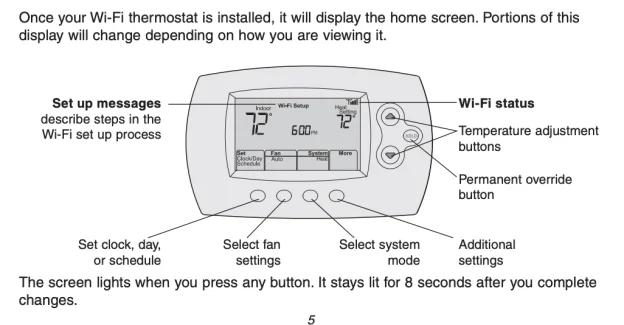
If you want to turn on the heat, adjust the air conditioning, or stop your thermostat from changing the temperature automatically, start with the controls on the front of the unit.
Honeywell thermostats come in several designs, from simple button-operated models to touchscreen and Wi-Fi thermostats. The controls may look different, but the basic settings are often similar.
1. How to Change the Temperature
Look at the display for the current room temperature and the temperature setting.
- Press + or −, or use the up and down arrows to adjust the target temperature.
- On a touchscreen model, tap the displayed temperature or use the on-screen controls.
- Give your heating or cooling system time to respond after making a change.
The temperature you select is the target temperature, not necessarily the current room temperature.
2. Choose Heat, Cool, or Off
Find the System button or the system-mode menu. Depending on your model and HVAC setup, you may see these options:
- Heat: Runs the heating system when needed.
- Cool: Runs the air conditioning when needed.
- Auto: Switches between heating and cooling automatically, if supported.
- Off: Turns off normal heating and cooling operation.
For everyday use, choose Heat in cold weather or Cool when you need air conditioning. If your thermostat offers additional modes, check the model’s manual before using them.
3. What Do Fan Auto and On Mean?
The fan setting controls how the system’s blower operates.
- Auto: The fan generally runs when heating or cooling is active.
- On: The fan runs continuously, even when the system is not actively heating or cooling.
If you want the fan to run only when needed, Auto is usually the practical choice. Available settings vary by thermostat and HVAC system.
4. How to Stop the Thermostat from Changing Temperature
If the temperature keeps changing by itself, your thermostat may be following a programmed schedule.
Look for Hold, Permanent Hold, or a similar option to maintain your chosen temperature instead of following the normal schedule. On some models, changing the temperature creates only a temporary hold; other models use different controls.
To return to scheduled operation, look for Run, Resume Schedule, or the equivalent option on your thermostat.
5. Do You Need to Set a Schedule?
A programmable thermostat can use different target temperatures at different times of the day. For example, you might prefer a different setting while sleeping or when nobody is home.
To change the schedule, look for Schedule, Program, or Menu. The exact steps depend on the model.
If you prefer to adjust the temperature manually, check whether your thermostat offers a non-programmed mode or lets you override the schedule.
Quick Troubleshooting
The thermostat does not seem to respond. Check the selected system mode and temperature setting. If the display is blank, consult your model’s manual for power or battery checks.
The temperature keeps returning to an earlier setting. Check whether a schedule is active and whether the thermostat is using a temporary hold.
The heating or cooling does not start immediately. Some systems have a built-in delay. If the system still does not respond, consult the thermostat manual and your HVAC system’s instructions.
Find the Manual for Your Honeywell Thermostat
Need help with a specific Honeywell thermostat? Start by checking the model number on the device or its documentation. The exact controls and menu options can vary between models.
If you own the Honeywell RTH6580WF Wi-Fi thermostat, refer to the Honeywell RTH6580WF User’s Manual for model-specific instructions.
For other thermostats, search by the full model number to find the matching user manual. This is especially helpful when you need instructions for programming a schedule, adjusting settings, or using Wi-Fi features.
Frequently Asked Questions
How do I use a Honeywell thermostat for the first time?
Select the appropriate system mode, set your preferred temperature, and check the fan setting. If the thermostat follows a schedule, review it to make sure it matches your routine.
Why does my Honeywell thermostat keep changing the temperature?
A programmed schedule or temporary hold may be responsible. Check the schedule and hold settings for your specific model.
Where can I find instructions for my thermostat?
Find the model number on the device or its paperwork, then search for the matching user manual.